

>/dev/null 2>&1 at the end of the command.That is what cron jobs are for: you give the server a command and a time, and it runs it on schedule without you. They send newsletters, clean temporary files, refresh currency rates in a store and run WordPress tasks regularly.
The parts of the Cron Jobs page #
| Section | Purpose |
|---|---|
| Cron Email | The address that receives the output of each run |
| Add New Cron Job | The timing and the command |
| Current Cron Jobs | Existing jobs with edit and delete buttons |
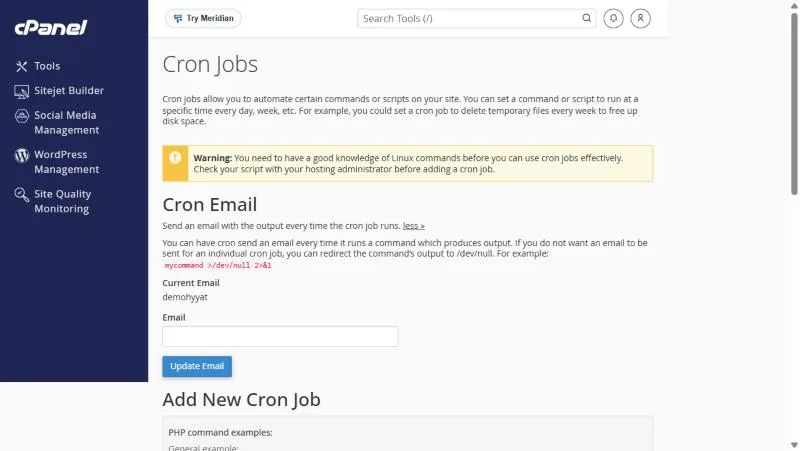
Adding a job #
- Open Cron Jobs in the Advanced section of cPanel.
- Choose from Common Settings such as Once Per Hour or Once Per Day. The fields fill in for you.
- Or set the fields by hand minute, hour, day, month and weekday.
- Type the command see the examples below.
- Click Add New Cron Job it appears in the list at the bottom.
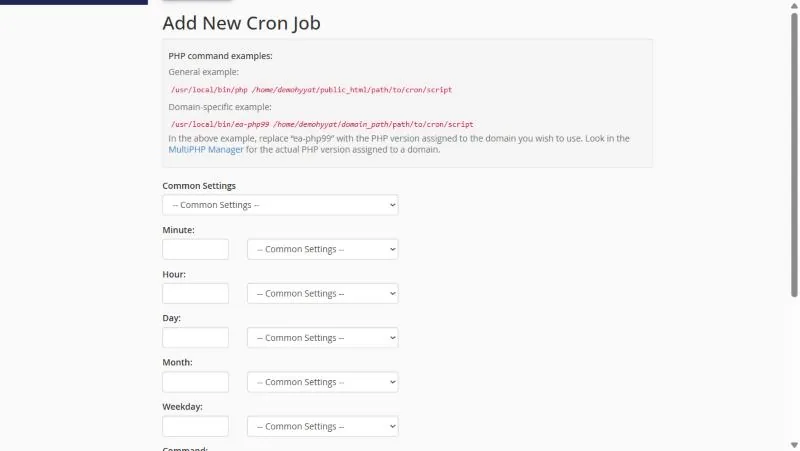
Reading the timing fields #
| Timing | Minute | Hour | Day | Month | Weekday |
|---|---|---|---|---|---|
| Every 15 minutes | */15 | * | * | * | * |
| Every day at 6 am | 0 | 6 | * | * | * |
| Every Sunday at midnight | 0 | 0 | * | * | 0 |
| The first of every month | 0 | 3 | 1 | * | * |
An asterisk means “every”, and times are server time, not yours. Avoid busy moments such as minute zero of every hour unless needed; pick a random minute such as 17.
Ready-made commands #
Run a PHP file; the full path with your account name is shown on the Cron page itself:
/usr/local/bin/php /home/USER/public_html/script.php >/dev/null 2>&1
Call a URL on your site, handy for plugins that give you a trigger link:
wget -q -O - "https://example.com/cron-url" >/dev/null 2>&1
WordPress: a real wp-cron #
WordPress runs its scheduled tasks when someone visits, so quiet sites run them late and busy sites run them too often. The cleaner fix:
- Add to wp-config.php the line
define('DISABLE_WP_CRON', true);above the “That’s all” line. - Create a job every 15 minutes with a command that runs
wp-cron.phpin the site folder.
/usr/local/bin/php /home/USER/public_html/wp-cron.php >/dev/null 2>&1
USER with your cPanel username and public_html with the domain folder for an addon domain. For a domain-specific PHP version use the path the page suggests, such as /usr/local/bin/ea-php83; check the version in MultiPHP Manager.Common problems #
| Problem | Fix |
|---|---|
| An email arrives after every run | Add >/dev/null 2>&1, or clear the address in Cron Email |
| The job does not run | Use full paths and check the file permissions |
| The site slows down at job time | Spread the timing; many close jobs use up account resources |
From our support desk #
- A customer set a job every minute to copy the database, resource usage climbed and the site slowed. Once a night was plenty.
- A mailbox filled up with thousands of cron emails because the command did not redirect its output. Adding
>/dev/null 2>&1stopped the flood. - A job never ran because it used a relative path such as
php script.php. Full paths for the file and PHP fixed it.
Frequently asked questions #
Which time zone do jobs use?
Server time, which may differ from your country.
How many jobs can I add?
There is no practical limit for sensible jobs, but bunching them uses account resources.
How do I pause a job?
Edit it and put # at the start of the command, or delete it and add it again later.
Does a normal WordPress site need cron?
Not strictly, but it makes scheduled tasks more accurate and lightens the load.
How do I know the job runs?
Put your email in Cron Email for a while to get the output, then remove it once sure.
Can I run a Python script?
If it is supported on your server, by its full path like any command; ask support for the right path.
- Change Your PHP Version in cPanel and Turn On Extensions: MultiPHP and Select PHP Version
- Resource Usage in cPanel: Reading CPU, Memory, Processes and What Faults Mean
- Track Website Errors and Logs in cPanel: the Errors and Raw Access Tools
- cPanel File Manager: Open It, Show Hidden Files, Change Permissions and More
- The Domains and Software Sections in cPanel: Domains, HTTPS Redirect, Zone Editor and PHP Version


