

There is no longer any reason for a site to run without HTTPS. AutoSSL in cPanel issues a free certificate for every domain on the server, renews it before it expires and replaces any certificate that is expired or too weak. Your job as server administrator is to switch it on once, then know how to read its log when one domain fails.
- Access to WHM as root at
https://your-server-hostname:2087(or the server IP on port 2087). Avoid the old port 2086: it is not encrypted. - Domains that actually point to the server IP. AutoSSL cannot validate a domain that points elsewhere.
- The autossl feature enabled in the accounts’ feature list (on by default).
The tool #
WHM › SSL/TLS › Manage AutoSSL
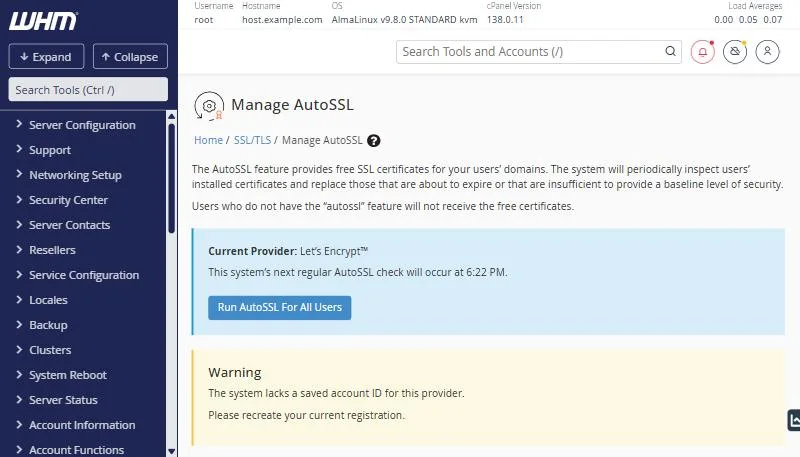
At the top: Current Provider, the time of the next regular check, and Run AutoSSL For All Users. Below it are four tabs.
| Tab | What is in it |
|---|---|
| Providers | The provider: Disabled, Let’s Encrypt or others available on your server, and accepting its terms |
| Options | Notification settings and when to replace an existing certificate |
| Logs | A log of each check: which domains succeeded, which failed and why |
| Manage Users | Turning AutoSSL on or off for particular accounts |
Free tool from Hyyat Host
SSL certificate checker
Make sure the certificate is trusted, see when it expires and whether it covers www.
Turning it on step by step #
- Choose the provider on the Providers tab. Let’s Encrypt is the most widely used.
- Accept the terms by ticking I agree to these terms of service. When the provider updates its terms, WHM asks you to accept again and may show a warning until you do.
- Save with Save.
- Run the first check with Run AutoSSL For All Users, or for one account from Manage Users.
- Review the result on the Logs tab a few minutes later.
Why did a certificate fail for one domain? #
AutoSSL proves domain ownership (DCV) by placing a file on the site and fetching it over the internet, or with a DNS record. If it cannot reach it, validation fails. These are the causes we see most in the log:
| In the log | Cause | Fix |
|---|---|---|
| The domain points to another IP | The A record for the domain or www is not on this server | Point it here, or remove the unused subdomain |
| HTTP validation failed | Cloudflare proxying or a redirect in .htaccess blocks the validation file | Exclude /.well-known/ from redirects, or use DNS validation |
| Automatic subdomains fail, such as cpanel, webmail and mail | They have no DNS records at the external DNS provider | Add the records, or ignore the failure if you do not use them |
| Provider rate limit reached | Too many repeated attempts for the same domain | Wait before retrying and do not run AutoSSL back to back |
| The user lacks the autossl feature | It is disabled in Feature Manager for their package | Enable it in the feature list |
What the site owner sees #
In the account’s cPanel, SSL/TLS Status lists each domain with its certificate state and a Run AutoSSL button for that account only. If customers know where it is, it saves a lot of tickets. For the background on certificates, see what an SSL certificate is and free versus paid certificates.
- A provider is selected and its terms accepted.
- The latest log has no failures for domains actually in use.
- The site opens over https without a warning.
AutoSSL questions #
Are AutoSSL certificates as secure as paid ones?
The encryption is the same strength. The difference is in validation type, warranty and domain coverage; see the guide on free versus paid certificates.
When does AutoSSL renew a certificate?
It checks regularly and renews certificates nearing expiry, with nothing for you to do.
Can I use a paid certificate on one domain and AutoSSL for the rest?
Yes. Install the paid certificate on that domain; AutoSSL does not replace a valid certificate from a trusted authority.
Does AutoSSL work with Cloudflare?
Usually, yes. If HTTP validation fails, exclude the validation path or pause the proxy temporarily.


