

A forwarder sends a copy of every message that reaches an address to another mailbox. For example, everything sent to [email protected] also reaches your personal email, so you do not have to check two inboxes.
When to use forwarding #
- A general address such as info that should reach several people.
- You want company mail in another mailbox you already use.
- A staff member has left and their mail should go to a colleague.
- An address that does not need its own mailbox, saving storage.
Forward a single address #
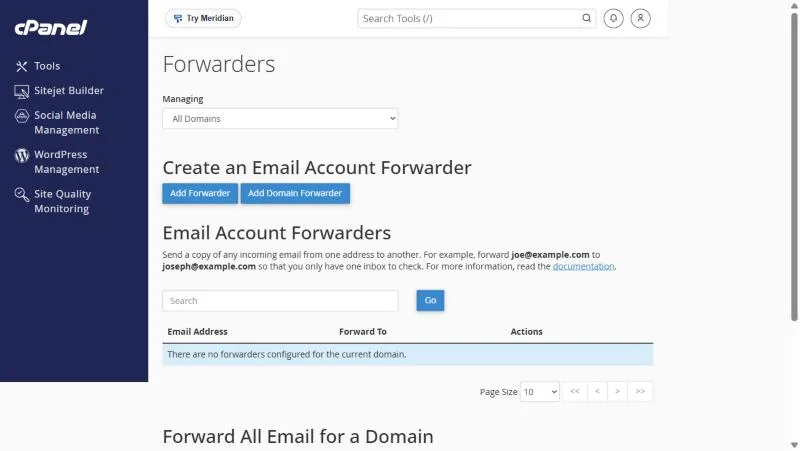
- Open Forwarders in the Email section of cPanel.
- Click Add Forwarder.
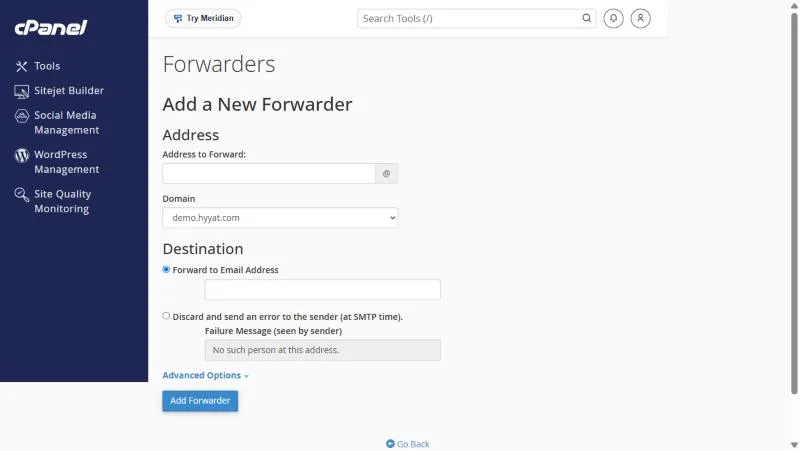
- Type the address to forward, such as sales, and pick the domain.
- Choose Forward to Email Address and enter the destination mailbox.
- Click Add Forwarder and it appears in the forwarders table.
Forward a whole domain #
Add Domain Forwarder sends all mail for one domain to another domain. For example, everything sent to @oldname.com goes to the same name at @newname.com. Useful when your company or domain name changes.
Forwarder or mailbox? #
| Forwarder | Mailbox | |
|---|---|---|
| Keeps messages | No, passes them on | Yes |
| Uses storage | No | Yes |
| Can send from it | No | Yes |
The forwarder does not work as expected #
- Forwarded mail lands in Gmail spam: forwarding passes spam along too. Turn on Spam Filters to reduce it.
- Forwarded mail does not arrive: check the destination address and trace it with Track Delivery.
- Removing a forwarder: click Delete next to it in the forwarders table.
Practical forwarding ideas #
- Forward info@ to both the manager and the assistant so nothing is missed.
- When your domain name changes, use a domain forwarder so old customers’ mail is not lost.
- Forward a departed employee’s mail to a colleague for a limited time, then stop it.
- Never forward an address to itself or in a loop between two addresses; it duplicates mail.
From our support desk #
- A customer forwarded all his mail to Gmail, and Gmail began flagging the forwarded messages as spam because they carried spam from the source. Turning on the cPanel spam filter before forwarding reduced it.
- A customer set up forwarding both ways between two mailboxes and the messages looped. Always remove one direction.
- A company wanted a general address without a mailbox, so it forwarded info to three staff, each replying from their own mailbox.
Need smarter rules than forwarding, such as moving one sender’s mail to a folder? Use email filters.
Frequently asked questions #
How do I forward email to another address in cPanel?
In Forwarders click Add Forwarder and enter the address and the destination.
Does a forwarder keep a copy?
No, unless the address also has a mailbox.
Can I forward to more than one address?
Yes, add a forwarder for each destination on the same address.
Does the sender see that the message was forwarded?
No, forwarding happens on the server without the sender noticing.
Can I forward to an outside address such as Gmail?
Yes, you can forward to any address on any domain.


