

The terms UI and UX appear constantly in design agency proposals and job adverts, often written together as “UI/UX” as if they were one thing. They are closely linked, but each answers a different question. Understanding the difference helps you evaluate your site and explain your feedback to a designer precisely.
What is UI? #
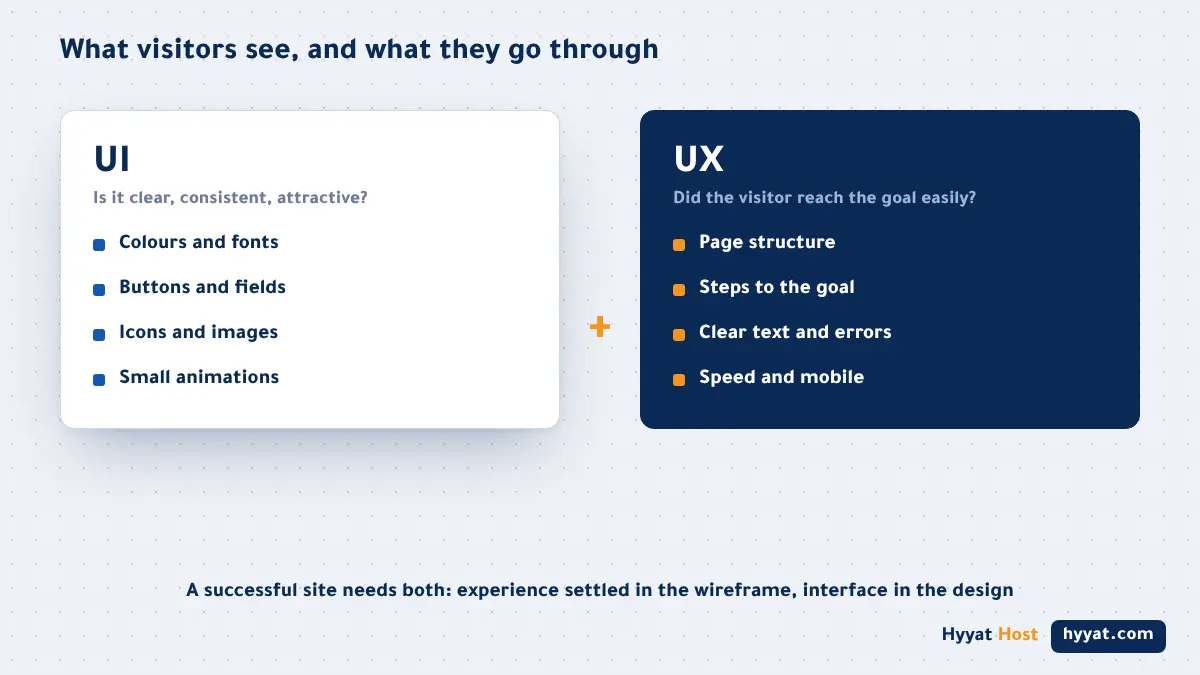
UI stands for user interface: everything a visitor sees and interacts with on the screen. It includes:
- Colours, fonts and the spacing between elements.
- The shape of buttons, fields, menus and cards.
- Icons, images and illustrations.
- Small animations, such as a button changing colour on hover.
A UI designer asks: is this element clear? Does it look clickable? Is the page consistent with the company identity? Many interface decisions come from the website visual identity.
What is UX? #
UX stands for user experience: the whole journey from the moment a visitor arrives until they reach their goal or leave. It includes:
- How pages and sections are organised, and where visitors find what they need.
- The number of steps to reach a goal, such as requesting a quote.
- Clear text, instructions and error messages.
- Speed, mobile use and ease of use for everyone.
A UX designer asks: why did the visitor come? What is the shortest path to their goal? Where do they hesitate or stop?
An example that shows the difference #
Picture a quote request form on a company website:
| Problem | UI or UX? | Why |
|---|---|---|
| The submit button is pale grey and does not look clickable | UI | The problem is the look of the element. |
| The form asks for ten fields the reply does not need | UX | The problem is the number of steps and what is asked of the visitor. |
| The error message is in English on an Arabic site | UX | The problem is clear communication with the visitor. |
| Fields have inconsistent widths and spacing | UI | The problem is visual order. |
| The form sits on a page visitors cannot reach from the menu | UX | The problem is the path to it. |
How they work together #
In the website design process, experience comes first and interface second. The sitemap and wireframe are UX decisions; the visual design is UI. That is why the wireframe is approved before colours, as explained in the company website design process.
A typical visitor journey #
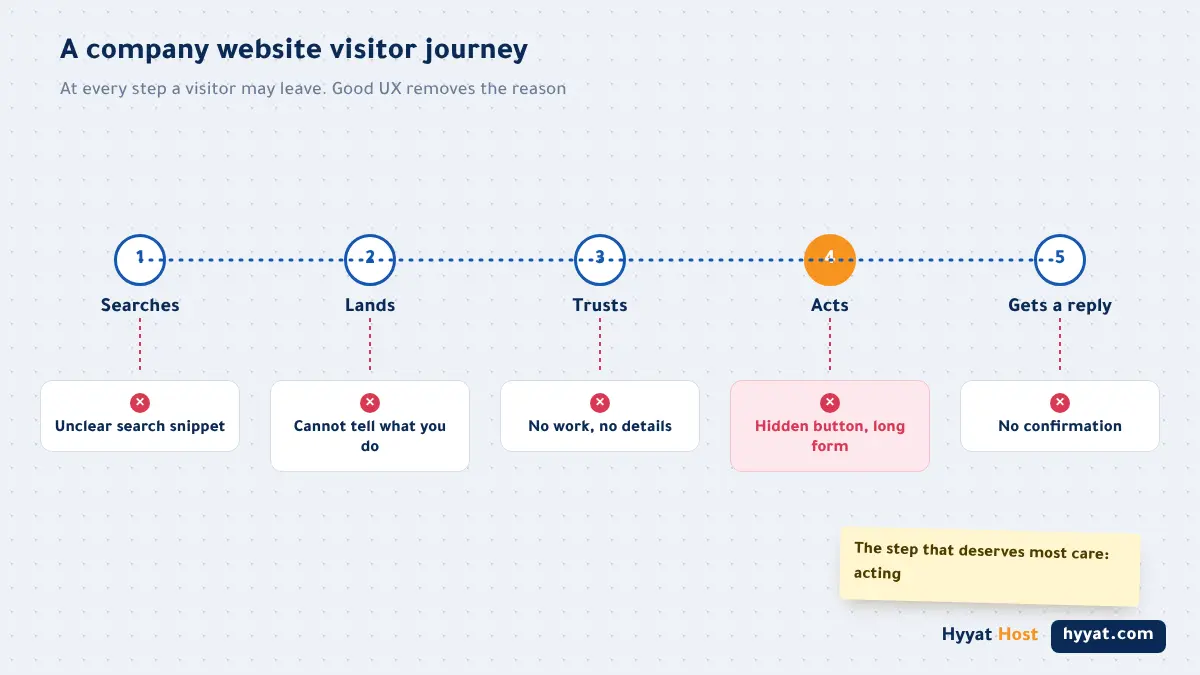
- They search on Google for a specific service, and see your page title and description in the results.
- They land on the page and decide within seconds whether it is what they need. A clear headline and a tidy design matter here.
- They look for trust past work, service details and how to get in touch.
- They take action tapping WhatsApp or sending the form. A visible button and a short form matter here.
- They wait for a reply A clear confirmation message after sending is part of the experience too.
At every step the visitor might leave. Improving the experience means finding those points and removing whatever makes people stop there.
Questions to check your own site #
Does my company website need a dedicated UX designer? #
Company brochure sites do not usually need a separate UX team, but they do need a designer who thinks about experience: someone who asks about the site’s goal and your customers before choosing colours. Large stores, platforms and applications have more complex experiences, and may need testing with real users before launch.
For the difference between design as a whole and development, see web design vs web development.
Simple principles for a better experience #
- Clarity before creativity: visitors expect the menu at the top and contact details at the bottom. Breaking conventions without reason confuses them.
- Consistency: the same element works the same way on every page. A blue button always means the same kind of action.
- Feedback: every tap needs a visible response: a button state, a confirmation message or a loading indicator.
- Prevent errors rather than fix them: a mobile number field opens the number pad, and dates are picked from a calendar instead of typed.
- For everyone: sufficient text contrast, adequately sized buttons, and alt text on images for screen-reader users.
These principles need no extra budget, only attention during design. Applying them to an existing site usually starts with reviewing the common website design mistakes.
UI and UX on WordPress sites #
On WordPress sites, the theme sets much of the interface, but the experience remains your responsibility and the designer’s: menu order, number of pages, where contact buttons sit and how long forms are. Two sites can start from the same theme and one can be far easier to use than the other. The theme gives you interface tools; the experience is built through content and layout decisions. For template versus custom design, see ready-made template or custom design.
Summary #
- UI is the look: what the visitor sees.
- UX is the journey: how they reach their goal and how it feels.
- Experience is settled in the wireframe, interface in the visual design, and a successful site needs both.
We design company websites by thinking about the experience before the look. See our website design service.
Frequently asked questions #
What is the difference between UI and UX in short?
UI is the user interface: the look and visual elements. UX is the user experience: how easily visitors reach their goal and how using the site feels.
Which matters more, UI or UX?
Both. A good experience with a weak interface loses trust, and a beautiful interface with a poor experience drives customers away.
Does UX only mean mobile?
No. Experience covers mobile and desktop, page structure, wording, speed and ease of use for everyone.
Which comes first in the design process?
Experience: the sitemap and wireframe. Then the interface: colours, fonts and the look of elements.
How do I give useful feedback to a designer?
Describe the problem you hit as a visitor, such as “I could not find the order button”, rather than proposing a direct fix such as “make the button bigger”.
- Web Design vs Web Development: Who Does What, and When You Need Each
- Website Visual Identity: Colours, Fonts and Logo, and How to Apply Them Consistently
- The Company Website Design Process: From the First Meeting to Launch
- Website Design Mistakes That Drive Customers Away: 12 Common Errors and How to Avoid Them
- What Pages Does a Company Website Need? And What Goes on Each Page


