

Yes, and that is the best use of IP Blocker: a specific address you saw misbehaving in the Visitors log, repeating login requests or probing your files. The tool adds a rule to your .htaccess file that stops that address opening any page.
Blocking an address #
- Identify the abusive address from Visitors in the Metrics section, or a WordPress security plugin log.
- Open IP Blocker in the Security section of cPanel.
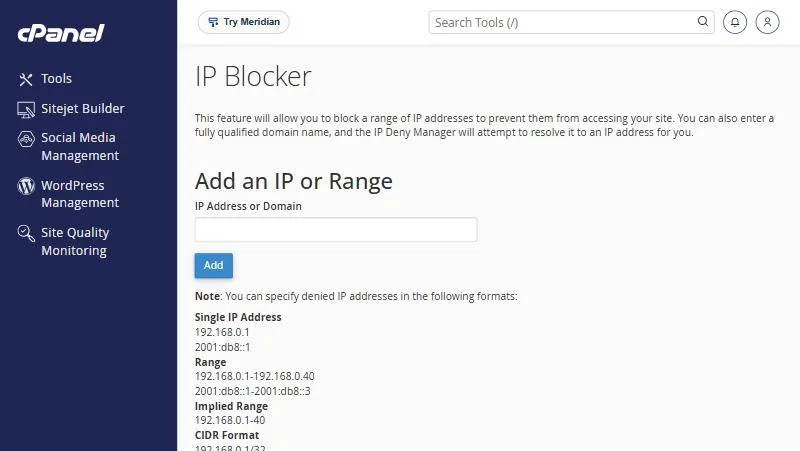
- Enter the address in the IP Address or Domain field.
- Click Add it appears in the list of blocked addresses.
Free tool from Hyyat Host
What is my IP?
See your public address, its type, country and reverse name in a second.
Accepted formats #
| Format | Example | What it blocks |
|---|---|---|
| Single address | 192.168.0.1 |
That address only |
| Range | 192.168.0.1-192.168.0.40 |
Every address between the two |
| Implied range | 192.168.0.1-40 |
The same, written shorter |
| CIDR | 192.168.0.1/32 |
A network sized by the number after the slash |
| Address prefix | 192. |
Every address starting with it; very broad |
| Domain name | example.com |
cPanel resolves it to an IP and blocks that |
5. can shut out millions of real visitors, including whole mobile networks. Always start with the narrowest range.When blocking helps and when it does not #
| Helps | Does not help much |
|---|---|
| A fixed address repeating login attempts | Attacks from thousands of changing addresses |
| A noisy crawler from a known network | Blocking a whole country, whose addresses are many and changing |
| A specific person whose address you know | Protecting email or FTP; this tool covers the website only |
For wide attacks, a service such as Cloudflare with protection rules and visitor challenges is stronger, together with keeping WordPress and its plugins updated.
Removing a block #
At the bottom of the page is the Currently-Blocked IP Addresses list. Click Delete next to the address. If you blocked your own address by mistake, connect over mobile data and remove it.
Did I block it, or did the server block me? #
This tool blocks visitors from your site. If your site and cPanel will not open from your own device, that is the server firewall blocking you after failed logins, covered in why you cannot open your site and cPanel.
From our support desk #
- A customer blocked a whole address prefix to stop one nuisance visitor, and orders from an entire mobile network vanished. Replacing it with the single address brought them back.
- A shop owner blocked his payment gateway by mistake because it appeared often in the log, and payment notifications stopped. Always check who owns an address before blocking it.
- A customer blocked his own office address while testing the tool. He opened cPanel over mobile data and removed it from the list.
Frequently asked questions #
Does the block stop the address using email?
No, the tool only blocks website access.
Can I block a whole country?
We do not recommend it with this tool. Use country rules in Cloudflare if needed.
Where is the block list stored?
In the .htaccess file in public_html.
What does a blocked visitor see?
A 403 error denying access.
How do I find who owns an IP address?
Use an online IP WHOIS tool; it shows the company or network that owns it.
Does blocking clash with Cloudflare?
If your site is behind Cloudflare, block in the Cloudflare dashboard, because the server sees Cloudflare addresses.
- How to Manage ModSecurity in cPanel
- Cannot Open Your Website or cPanel from Your Computer? Your IP May Be Blocked
- View the Latest Visitors to Your Site in cPanel: Who Came, When and What They Asked For
- Turn On Two-Factor Authentication in cPanel: Protection Even If Your Password Is Stolen
- The Security Section in cPanel: IP Blocker, SSL Certificates, Two-Factor Authentication and Hotlink Protection


