

First, know the direction #
| Setting | Controls | Example |
|---|---|---|
| TCP_IN | Connections arriving from the internet | Visitors opening an app on port 8443 |
| TCP_OUT | Connections the server starts outwards | Your site calling a payment service or API on a special port |
| UDP_IN and UDP_OUT | The same for UDP | DNS on port 53 |
| TCP6_IN and friends | The same for IPv6 | If the server uses IPv6 |
Second, from WHM #
- Open CSF from Plugins in WHM.
- Click Firewall Configuration a long page of settings appears.
- Find TCP_IN with Ctrl+F in your browser.
- Add the port at the end of the list after a comma, such as
,8443. For a range, use30000:35000. - Save and restart click Change at the bottom, then Restart csf+lfd.
Third, from the command line #
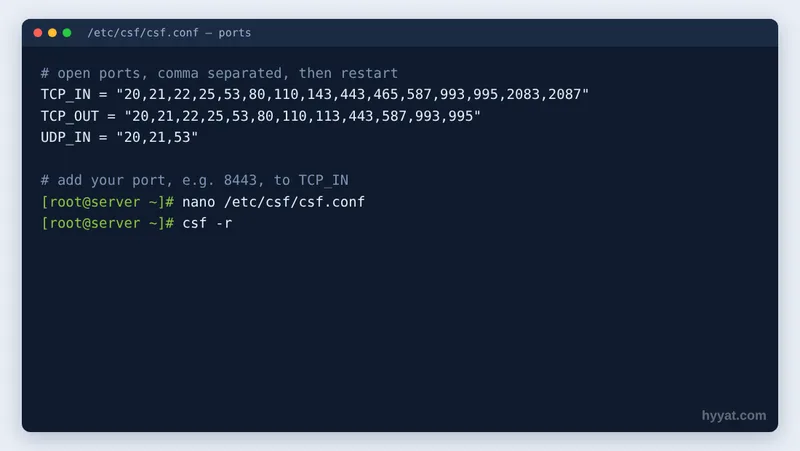
Open the file in any editor, change the line, then run csf -r. Do not remove an existing port unless you know it is unused.
Ports you will see on cPanel servers #
| Port | Service |
|---|---|
| 20, 21 | FTP |
| 22 | SSH (unless changed) |
| 25, 465, 587 | SMTP mail sending |
| 110, 995 | POP3 and secure POP3 |
| 143, 993 | IMAP and secure IMAP |
| 53 | DNS |
| 80, 443 | Websites |
| 2082, 2083 | cPanel |
| 2086, 2087 | WHM |
| 2095, 2096 | Webmail |
| 2077, 2078 | Web Disk |
Is the port really open? #
- From another machine try
nc -zv server-address 8443, or an online port checker. - Make sure something is listening:
ss -tlnp | grep 8443. A port open in the firewall does not mean a service runs on it. - If your provider has an external firewall (such as the VPS panel’s), open the port there too.
Three things to remember #
- TCP_IN is incoming and TCP_OUT outgoing, each with its own list.
- After any change: Change, then Restart csf+lfd, or csf -r over SSH.
- An open port with nothing listening still will not answer.
Passive ports for FTP #
FTP clients open a second connection for data on a random port from a set range called passive ports. If FTP connects and then hangs when listing files, that range is usually closed in the firewall. On cPanel with Pure-FTPd the default range is 30000:35000, added to TCP_IN exactly like that with the colon. If you change the range in the FTP server settings, change it in CSF too.
Before closing any port already in the list, see what uses it with ss -tlnp. Closing a running service’s port cuts customers off immediately, and you may not connect the two until hours later.
Port questions #
I changed the SSH port. What do I do in CSF?
Add the new port to TCP_IN before restarting SSH, and only remove 22 after logging in on the new port.
How do I open a port for one address only?
Add a line to csf.allow such as tcp|in|d=3306|s=203.0.113.5, then restart CSF.
I opened the port and it still does not work
Check that a service is listening, check your provider’s external firewall, and make sure you restarted CSF after saving.
Should I close the unencrypted ports 2082 and 2086?
If everyone logs in through the encrypted 2083 and 2087, closing them reduces the attack surface, but check nobody depends on them first.


