

What is a redirect? #
A redirect sends visitors (and search engines) from one web address to another. It is useful when you move a page, change your domain, or want a short, easy address that leads to a long one. There are two types:
- Temporary (302): tells browsers and search engines that the move is temporary, so they keep the original address.
- Permanent (301): tells them the page has moved for good, so they update the stored address. Use 301 when you move pages, so Google transfers the rankings to the new URL.
Set up a redirect in cPanel #
1. Log in to cPanel. See how to log in to cPanel.
2. In the Domains section click Redirects.
3. The redirect options appear.
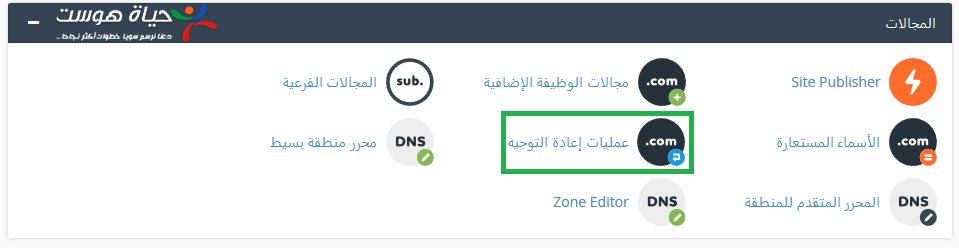
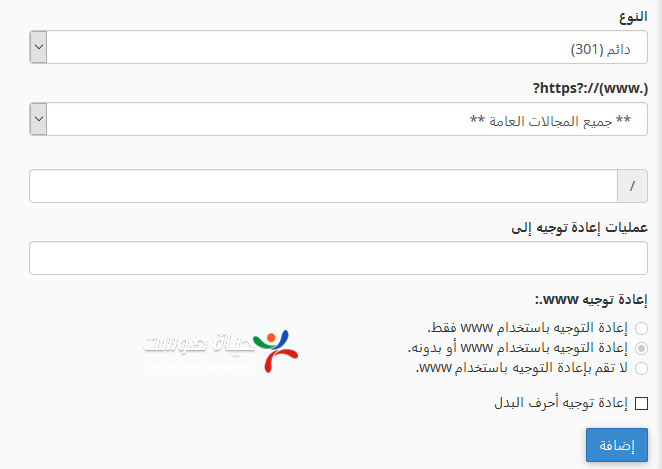
4. Choose the redirect type (301 or 302). Choose only the domain if you want to redirect the whole site, or add a path if you want to redirect a specific page. Enter the address to redirect to.
5. Choose how www is handled: Only redirect with www redirects only visitors who type www; Redirect with or without www redirects everyone; Do not redirect www leaves www visitors on the original address. Then click Add.
To forward email instead of web pages, see how to set up email forwarders in cPanel.
Related service: Hyyat Host shared hosting with cPanel, free SSL and 24/7 support.


