

Sometimes accounting software on an office PC, or an app on another server, needs to read the site’s database directly. MySQL refuses any connection that does not come from the server itself by default, which is good for security. This guide opens the door for one specific address only.
Layer one: the account’s cPanel #
In the database owner’s cPanel, open Remote Database Access under Databases, enter the outside machine’s IP and click Add Host. This is what gives the database user permission to connect from that address.
Layer two: WHM (for all accounts) #
WHM › Database Services › Manage Database Access Hosts
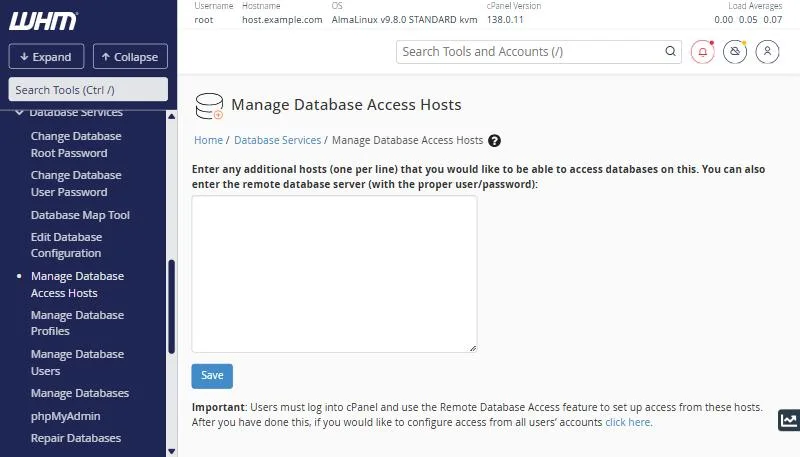
Enter one address per line and Save. As the page itself says, this is not enough on its own: the account owner must add the address in Remote Database Access, or you click the link at the bottom to apply the addresses to every account.
Layer three: the firewall #
Open port 3306 to one address, not the world. In CSF, add a line to /etc/csf/csf.allow:
tcp|in|d=3306|s=203.0.113.5   # accounting PC
csf -r
If your provider has an external firewall, allow the same address there. Ports are covered in opening a port in CSF.
Connection details to give the app #
| Field | Value |
|---|---|
| Host | The server’s IP or hostname, not localhost |
| Port | 3306 |
| Database | The full name with prefix, such as user_dbname |
| User | The full database user with prefix, not the cPanel user |
| Password | The database user’s password |
A safer alternative: an SSH tunnel #
Instead of opening 3306, the app can connect through an SSH tunnel: it connects to the server on the SSH port, then reaches the database locally. Tools such as HeidiSQL and DBeaver support this directly.
Connection errors #
| Message | Likely cause |
|---|---|
Host ... is not allowed to connect |
The address is not in Remote Database Access |
Can’t connect ... (110) or a timeout |
The port is closed in the firewall or at the provider |
Access denied for user |
Wrong username or password, or the prefix is missing |
| Works, then stops | The outside machine’s IP changed (a home connection with a dynamic address) |
A full example: accounting software in the office #
- Is the office IP fixed? Ask the internet provider. If it changes, an SSH tunnel or VPN suits better than opening the port.
- The account owner adds the address in Remote Database Access in cPanel.
- You open the port for that address one line in csf.allow as above.
- Test from the office
mysql -h server-address -u user_db -p, or from the software itself. - Document it note why the port was opened and for which address, so you can close it when no longer needed.
Remote access questions #
Can I allow a range of addresses?
Yes. Remote Database Access accepts a form such as 203.0.113.%, but keep the range as narrow as possible.
Is the connection encrypted?
Not by default. For sensitive data, use an SSH tunnel or an SSL connection if the app supports it.
Does this work on shared hosting?
Yes, through Remote Database Access in cPanel, provided the port is allowed on the server. Ask support if it does not work.
Does remote access affect site performance?
Heavy queries from the outside app use the same database resources, so watch them if they are large.


