

Spam Filters in cPanel uses Apache SpamAssassin: it checks every incoming message and gives it a score. The higher the score, the more likely it is spam. When it passes the threshold, the message is treated as spam.
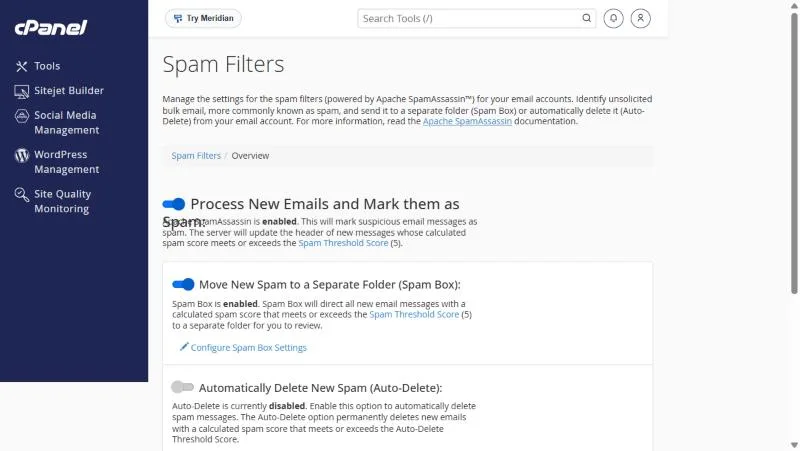
The three options #
| Option | What it does | Our advice |
|---|---|---|
| Process New Emails and Mark them as Spam | Scans mail and marks spam | On |
| Move New Spam to a Separate Folder (Spam Box) | Moves spam to a spam folder instead of the inbox | On |
| Automatically Delete New Spam (Auto-Delete) | Deletes spam permanently without you seeing it | With care, at a high score |
In the demo account shown: scanning is on, Spam Box is on, Auto-Delete is off, and the spam threshold score is 5.
The Spam Threshold Score #
- Lower score (such as 3): a stricter filter that catches more spam but may flag good mail.
- Higher score (such as 8): a gentler filter with fewer mistakes but more spam getting through.
- Start with the default and adjust based on what you find in the spam folder.
Allow and block lists #
Under Additional Configurations on the same page, add addresses to the Whitelist so their mail is never treated as spam, or to the Blacklist so it always is. Whitelist your important customers.
Your own mail lands in other people’s spam? #
That is a different problem: this filter is for mail you receive. For mail you send, see enabling SPF and DKIM and why website emails go to spam.
Tips for reducing spam #
- Do not publish your full address on website pages; use a contact form instead.
- Never reply to spam or click its unsubscribe links.
- Keep the Default Address on reject, not catch-all.
- If good mail lands in spam, add the sender to the Whitelist.
Situations that keep coming up #
- A customer turned on auto-delete at a low score and lost mail from a new client. The safe start is moving spam to the Spam Box without deleting.
- A store got lots of spam from one domain and blocklisted it instead of lowering the score for every message.
- An important supplier’s mail went to spam, so it was allowlisted and stopped being misclassified.
An extra layer against automated spam is Greylisting, if it is enabled on your server.
Frequently asked questions #
How do I reduce spam in my mailbox?
Turn on Spam Filters and Spam Box in cPanel so spam moves to a spam folder.
What spam score should I use?
Start with the default (5); lower it if spam gets through, raise it if good mail is flagged.
Should I turn on Auto-Delete?
Only with care, because deleted messages cannot be recovered.
Where is the spam folder?
In Webmail or your mail app, named spam or Junk depending on the app.
Does SpamAssassin scan outgoing mail too?
These settings apply to mail you receive.
- The Email Section in cPanel: A Guide to Every Tool and When to Use It
- Email Filters in cPanel: Filters for One Mailbox or the Whole Account
- Enable SPF and DKIM with Email Deliverability in cPanel So Your Mail Avoids Spam
- Why Do Your Website and Business Emails Go to Spam? Causes and Step-by-Step Fixes


