

If someone emails an address that does not exist on your domain, such as sale@ instead of sales@, what happens? The Default Address tool decides.
The options #
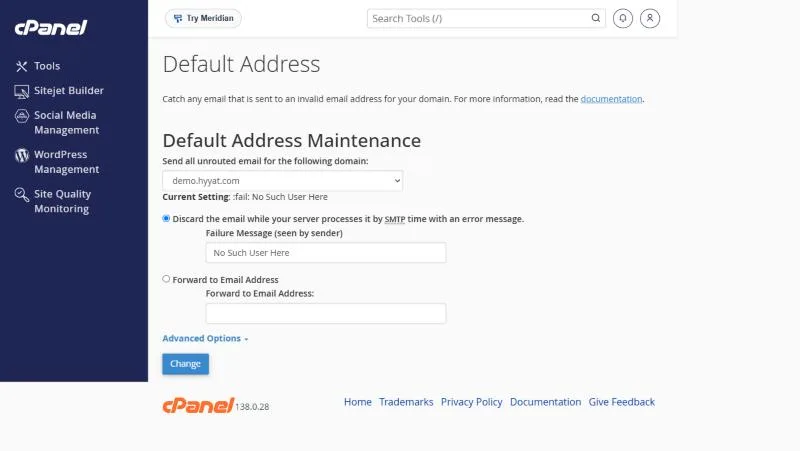
- Open Default Address in the Email section of cPanel.
- Pick the domain from the list. The Current Setting appears below it.
- Choose the action: reject with an error, or forward to an address.
- Click Change.
| Option | What happens | Our advice |
|---|---|---|
| Discard with an error (fail) | The message is rejected and the sender learns the address does not exist | Yes |
| Forward to Email Address (catch-all) | You receive all mail for any address on your domain | Only when needed |
The setting shown is fail: No Such User Here, meaning mail is rejected with that message.
Why we do not recommend catch-all #
- Spammers try random names on your domain, and you get them all.
- Your mailbox fills up quickly.
- A sender who mistyped the address never learns of the mistake.
When catch-all helps #
When moving an old domain and you want to catch mail for old addresses you do not all know, for a short time. Then create forwarders for the important ones and switch back to rejecting.
The Default Address and forwarders together #
- Addresses that exist (mailboxes or forwarders) are not affected by the Default Address.
- The Default Address applies only to addresses that do not exist.
- If you have several domains, set the Default Address for each one.
- Check the setting after moving a site from another host; an old catch-all may come with it.
From our support desk #
- A company turned on catch-all to catch mistyped addresses, and within a month received thousands of spam messages to random addresses. Switching back to reject ended it.
- A customer renamed an old mailbox and used a forwarder from the old address instead of catch-all, keeping things clean.
- A store used different addresses per supplier, such as supplier1@, and needed catch-all briefly during setup, then turned it off.
For an old address whose mail should keep arriving, a forwarder is cleaner than catching every address.
Frequently asked questions #
What is catch-all email?
A setting that forwards all mail sent to any non-existent address on your domain to one mailbox.
Should I turn on catch-all?
Usually not, because it brings in a lot of spam. Use forwarders for the addresses you need.
Where do I change the Default Address?
In Default Address in the Email section of cPanel.
Does rejecting hurt my domain reputation?
No, clearly rejecting non-existent addresses is normal behaviour.
Can I write my own rejection message?
Yes, type it in the Failure Message field before clicking Change.


