

In shortIf you forgot your Hyyat Host client area password, choose Forgot Password?, enter the email registered on your account, and open the reset email. Click the reset link, enter a new strong password twice and save. The link is temporary; if it expires, request a new one.
If you forgot your client area password, you can recover your account and set a new password in a few minutes, as long as you can access the email address registered on the account.
Steps to reset your password #
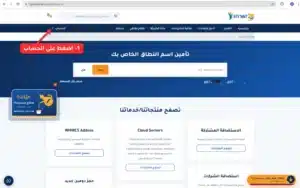
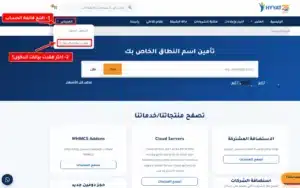
- Open the Forgot Password page. In the client area, open the Account menu at the top and choose Forgot Password?.
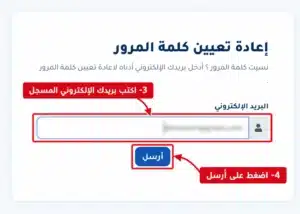
- Enter your registered email in the email field and click Submit.
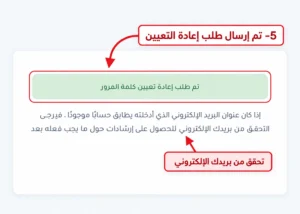
- Open the reset email in your inbox. If it is not there after a few minutes, check the Spam or Junk folder.
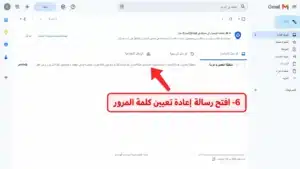
- Click the reset link in the email. If the button does not work, copy the link and paste it into your browser’s address bar.
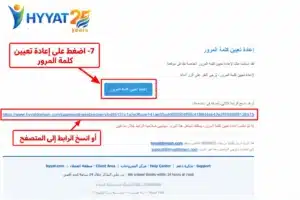
Important: the reset link is temporary. If it has expired, request a new one from the Forgot Password page.
- Enter a new password twice and click Save Changes. Use a strong password with upper and lower case letters, numbers and at least one symbol, and do not reuse a password from another account.
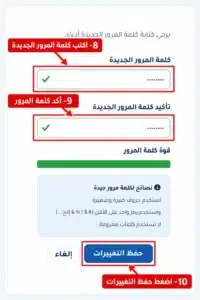
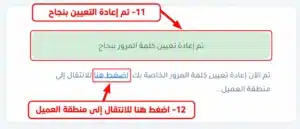
- Log in with the new password. You will see a confirmation that the password was reset, with a link back to the client area.
If the reset email does not arrive #
- Make sure you entered the same email registered on your Hyyat Host account.
- Check the Spam or Junk folder and wait a few minutes before trying again.
- If you no longer have access to the registered email, contact support to verify your identity and update it.
Common mistakes #
- Entering an email different from the one registered.
- Using an old reset link that has expired.
- Typing two different passwords in the password and confirm fields.
- Choosing a weak password that does not meet the security requirements.
Security tip: never send your password or any secret details by email or chat, even to support. Just describe the problem. After logging in, turn on two-step verification for your account.
Summary #
- Choose Forgot Password? and enter your registered email.
- Open the email and click the reset link before it expires.
- Save a new strong password and log in.
Account and security guides: managing your domains and the rest of the client area section.
Frequently asked questions #
How do I reset my Hyyat Host client area password?
Choose Forgot Password?, enter your registered email, open the reset email and click the link, then save a new password.
Why didn’t the reset email arrive?
You may have entered a different email, or the message went to Spam. Wait a few minutes and check the Junk folder.
What if the reset link has expired?
Do not reuse it. Request a new one from the Forgot Password page.


