

Tools such as Google Analytics tell you how many humans visited. The cPanel Visitors tool shows what actually reached the server: visitors, crawlers, password-guessing attempts and requests for pages that do not exist. That makes it a diagnostic tool rather than a marketing one.
Opening the list #
- Open Visitors in the Metrics section of cPanel.
- Choose the domain it may appear twice: once with (SSL) for https visits and once without.
- Click the magnifier icon the latest requests open, newest first.
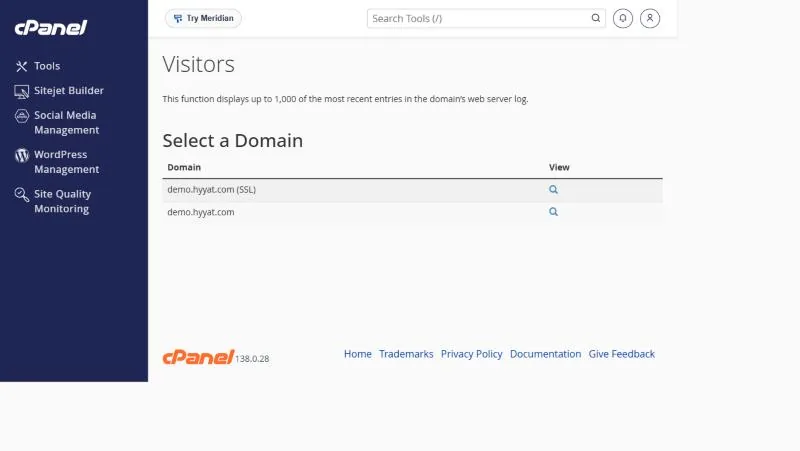
What each column means #
| Column | Meaning |
|---|---|
| IP | The address of the device that made the request |
| URL | The page or file requested |
| Time | When it was requested |
| Size | Bytes the server sent back |
| Status | Result code: 200 success, 404 not found, 403 forbidden, 500 server error |
| Referring URL | The page the visitor came from |
| User Agent | The browser or program that sent the request |
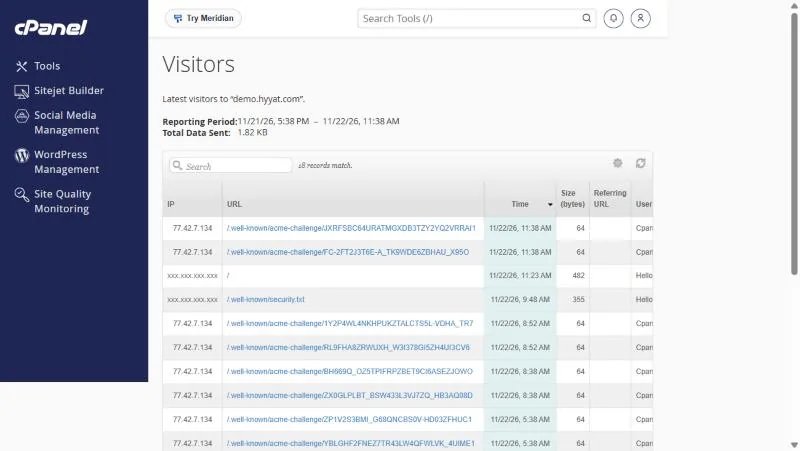
We hid visitor addresses in the picture. Repeated requests for /.well-known/acme-challenge/ are normal; they validate the free SSL certificate.
Patterns worth noticing #
| What you see | What it usually means |
|---|---|
Many requests for wp-login.php from one address |
Someone trying to guess your WordPress password |
Requests for files such as .env or config.php.bak |
An automated scan for sensitive files, see exposed files |
| Googlebot or bingbot in User Agent | Search engine crawling; normal and useful |
| Many 404s for one address | An old link that needs a redirect |
I want fuller statistics #
This list only shows the latest requests. To analyse traffic over months, use an analytics tool such as Google Analytics, or download the full logs from Raw Access.
Frequently asked questions #
Why can I not see all of today’s visitors?
The tool shows the last 1,000 requests only, and a busy site passes that quickly.
Can I block a suspicious IP?
Yes, with IP Blocker in the Security section, or ask support.
Why is my domain listed twice?
Once for https visits and once for http.
Does the tool slow my site down?
No, it only reads the server log.
- Track Website Errors and Logs in cPanel: the Errors and Raw Access Tools
- Check Bandwidth Usage in cPanel: Reading the Page and Cutting Usage
- Exposed Sensitive Files on Your Site: .env, .git and Backups, and How to Hide Them
- Redirect a Page or Domain in cPanel: 301 vs 302 and the www Options
- Statistics and the Metrics Section in cPanel: Track Disk Space, Bandwidth, Errors and Resources


