

cpmove file or a full cPanel backup, use Transfers, then Transfer or Restore a cPanel Account. Make sure free space is at least twice the file size.A restore is when you find out how good your backup settings were. WHM has two tools for full restores, each with a different source, and mixing them up is a common reason for “I cannot find the backup”. Start by identifying where your backup came from:
| Backup source | Tool | Example |
|---|---|---|
| WHM’s automatic backups on the server | Backup Restoration | A site was hacked yesterday and you want last week’s copy |
A cpmove-user.tar.gz or backup-...tar.gz file |
Transfer or Restore a cPanel Account | A full backup the customer downloaded from cPanel, or a move from another server |
| Another cPanel server that is still running | Transfer Tool | Moving several accounts directly between servers |
- Access to WHM as root at
https://your-server-hostname:2087(or the server IP on port 2087). Avoid the old port 2086: it is not encrypted. - Free space on the server of at least twice the backup file size, because the server unpacks it during the restore.
- A decision up front: are you replacing an existing account, or bringing back a deleted one?
Method one: from the server’s automatic backups #
WHM › Backup › Backup Restoration
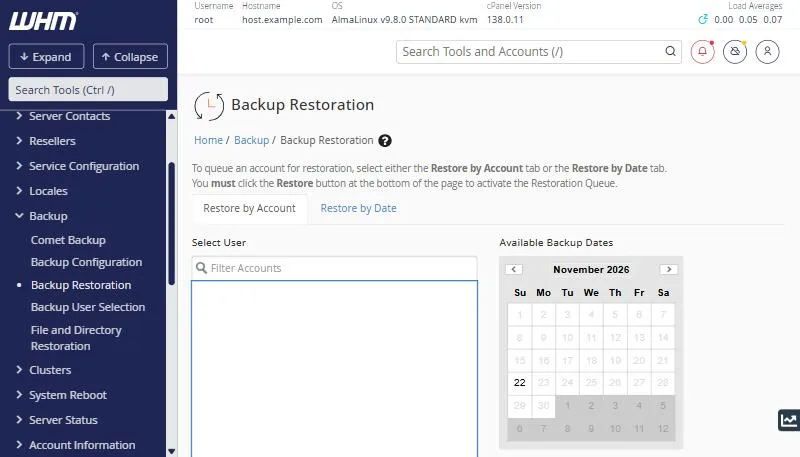
- Choose a view Restore by Account to start from the account and see its dates, or Restore by Date to start from a date and see its accounts.
- Pick the account and date available dates are highlighted in the calendar.
- Choose what to restore from Restore Subdomains, Restore Mail Configuration and Restore Databases, plus Give Dedicated IP Address if the account had its own IP.
- Add it to the queue with Add Account to Queue. You can queue several accounts.
- Click Restore at the bottom of the page. Without it nothing starts; the queue just waits.
Method two: from a cpmove file #
WHM › Transfers › Transfer or Restore a cPanel Account
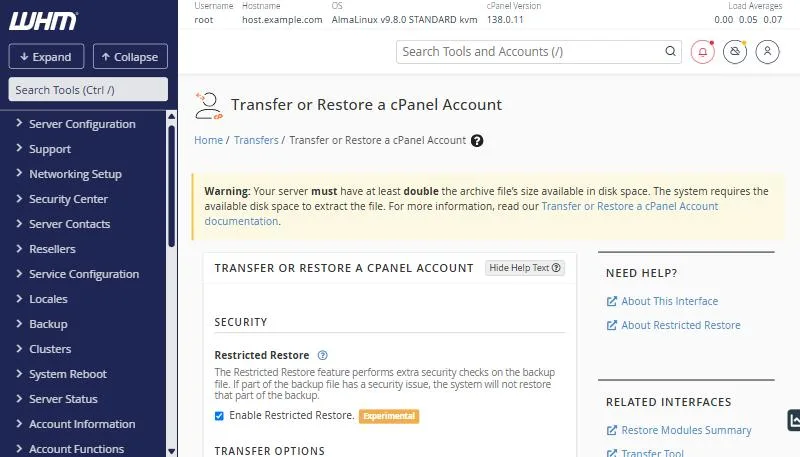
This tool replaced the old Restore a Full Backup/cpmove File. At the top is a plain warning: free disk space must be at least double the backup file’s size.
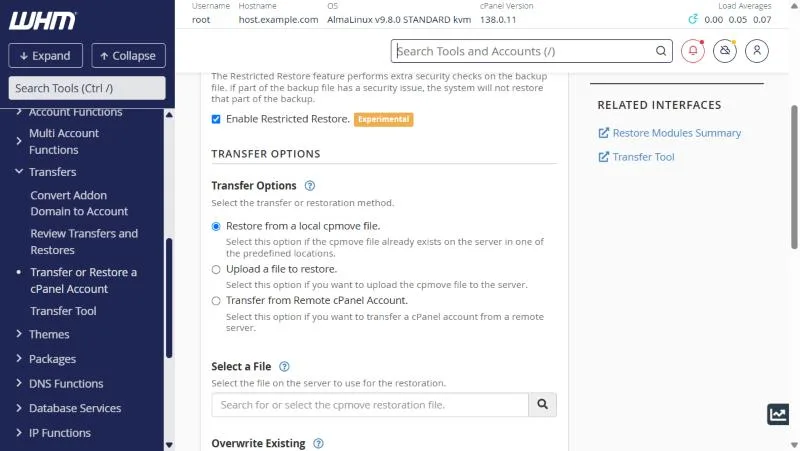
| Option | What it means |
|---|---|
| Restricted Restore | Extra security checks that skip any suspicious part of the backup. Useful for backups from a source you do not fully trust, but it is experimental and may skip good parts |
| Restore from a local cpmove file | The file is already on the server in a known location such as /home or /root |
| Upload a file to restore | Upload it straight from your computer. Fine for small and medium files |
| Transfer from Remote cPanel Account | Pulls the account from another cPanel server with its login details |
| Overwrite if the cPanel user already exists | Replaces an existing account with the same username. Careful: the current account’s content is replaced |
| Replace All Matching A Records | Swaps the old server IP for the new one in all of the account’s DNS records. The default and right for moves |
| Dedicated IP Address | Gives the restored account its own IP, if one is free |
- Choose the file source and find it in Select a File if it is on the server.
- Set the overwrite and A record options as in the table.
- Click Restore a live log shows each stage: files, databases, mail, then DNS.
Over SSH, the equivalent for a file already on the server is /scripts/restorepkg /home/cpmove-user.tar.gz.
Common restore errors #
| Message or problem | Fix |
|---|---|
| The file does not appear in Select a File | Move it to /home or /root and make sure its name follows the standard pattern, such as cpmove-user.tar.gz |
| The account already exists | Tick Overwrite, or terminate the current account first after backing it up |
| Not enough disk space | Free space until it is twice the file size |
| The domain is in use by another account | Remove the domain from the other account first |
| The restore finished but the site does not work | Check the account’s PHP version and the database details in the site’s config file |
- The account is in List Accounts with the right package.
- The site loads with data from the right date.
- Mail works and databases connect.
- DNS records point to this server’s IP.
Restore questions #
Can I restore a single file instead of the whole account?
Yes, from Backup, then File and Directory Restoration, or the customer can restore it from cPanel if backups are available to them.
What is the difference between a cpmove file and a full cPanel backup?
Both are complete account archives in nearly the same format and are restored with the same tool.
Are mailbox and database passwords restored?
Yes. A full backup carries mail settings and database users with their passwords.
How long does a restore take?
It depends on the account size, file count and disk speed. Large accounts can take a while, so do not interrupt it.
- Automatic Backups in WHM (Backup Configuration): Daily, Weekly and an Off-Server Copy
- A Full Backup of Your Website from cPanel: Files, Databases and Email
- Terminating One or Several cPanel Accounts in WHM: The Safe Way Before You Click Remove
- Creating a New cPanel Account in WHM: Every Field in Create a New Account Explained
- cPanel and WHM on a VPS — The Complete 2026 Guide: What They Are, Licensing, and When to Choose Them


