

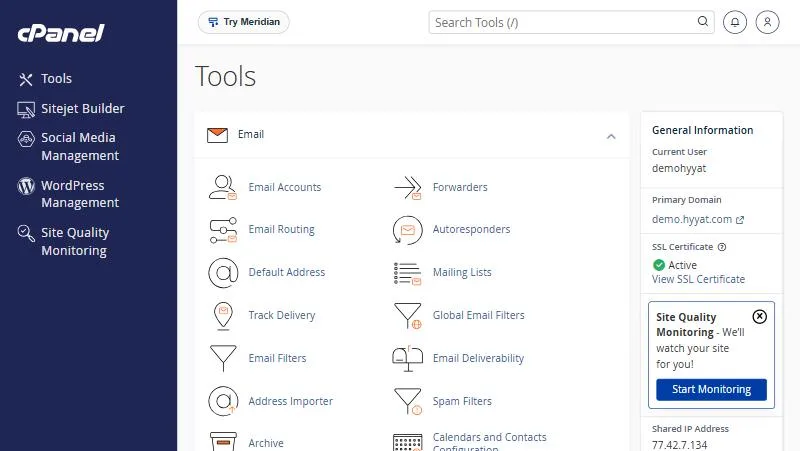
An address on your domain such as [email protected] earns more trust than a free mailbox. Everything you need to manage it is in the Email section of cPanel. This guide walks through every tool in the section, with a link to each tool’s illustrated guide.
The core tools #
| Tool | What it does | Guide |
|---|---|---|
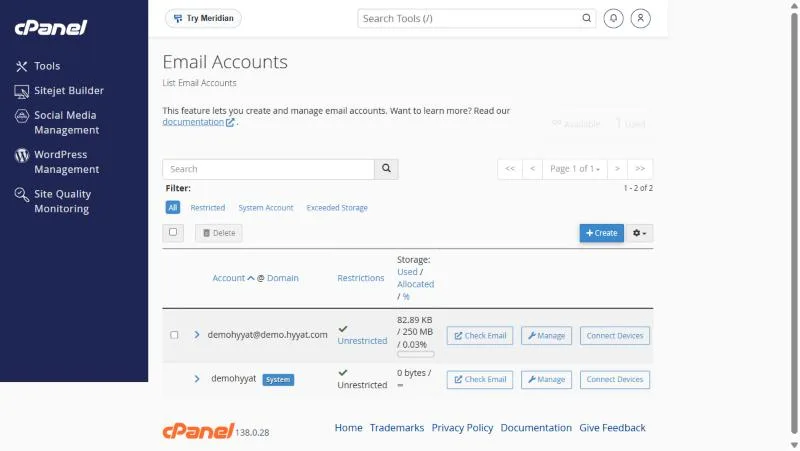
| Email Accounts | Create mailboxes, change their password and storage, suspend them | create an email account |
| Check Email (Webmail) | Open your email in a browser, no app needed | log in to Webmail |
| Connect Devices | Settings for connecting email to your phone and Outlook | email client settings |
| Forwarders | Send a copy of incoming mail to another address | email forwarding |
| Autoresponders | Automatic replies when you are away or out of hours | autoresponders |
| Default Address | What happens to mail sent to an address that does not exist | Default Address |
Protection and delivery tools #
| Tool | What it does | Guide |
|---|---|---|
| Spam Filters | Detect spam and move it to a separate folder | Spam Filters |
| Email Filters | Rules that move or delete mail by sender or subject | email filters |
| Email Deliverability | Check SPF and DKIM so your mail does not land in spam | SPF and DKIM |
| Track Delivery | See whether a message was delivered or rejected, and why | Track Delivery |
| Email Routing | Choose where your domain mail is received: here or at Google, for example | Google Workspace setup |
Storage and organisation tools #
| Tool | What it does | Guide |
|---|---|---|
| Email Disk Usage | See what fills your mailbox and delete old mail | email disk usage |
| Archive | Keep a copy of incoming and outgoing mail for a period you choose | email archiving |
| Mailing Lists | One address that sends to a group of people | mailing lists |
| Calendars and Contacts | A calendar and contacts that sync with your phone |
Where to start #
- Create your mailbox in Email Accounts.
- Check Email Deliverability and fix SPF and DKIM if a problem is shown.
- Connect your phone with Connect Devices, or open Webmail.
- Turn on Spam Filters to cut down on spam.
Tips for professional email on your domain #
- Create addresses by role (info, sales, support), not only by person, so mail is not lost when staff change.
- Use a different password for every mailbox and change it when someone leaves.
- Check Email Deliverability after any DNS change or domain move.
- Check storage monthly; a full mailbox rejects new mail without you noticing.
- Do not send bulk marketing mail from hosting email; it hurts your domain reputation.
From our support desk #
- A start-up created a mailbox per employee, then needed a general orders address. Instead of a new mailbox it set up a forwarder from orders to two people, paying for no extra space.
- A shop found its mail landing in customers’ spam. Email Deliverability showed DKIM was off, and fixing it solved the problem within a day.
- A law office needed a copy of all correspondence, so it turned on archiving for a year instead of relying on staff mailboxes.
Need professional email for a whole team with more space per mailbox? Compare Email Hosting with Business Hosting; this article compares them in detail.
Frequently asked questions #
Where are the email settings in cPanel?
In the Email section, the first section on the Tools page.
How do I create an email address on my domain?
In Email Accounts click Create, then enter the name and a password.
Why do my emails go to spam?
Often because of SPF or DKIM records. Check them in Email Deliverability.
Is email included in my hosting?
Yes, every cPanel plan lets you create email on your domain. The number and storage depend on your plan.
Can I read my domain email in Gmail or Outlook?
Yes, by connecting the mailbox over IMAP, or by moving your email to Google Workspace.
- How to Create an Email Account on Your Domain in cPanel
- How to Log In to Webmail: Links, Steps and Fixes
- Email Client Settings for Your Phone and Outlook: IMAP, POP3, SMTP and Ports
- Enable SPF and DKIM with Email Deliverability in cPanel So Your Mail Avoids Spam
- Why Do Your Website and Business Emails Go to Spam? Causes and Step-by-Step Fixes


