

Providers such as Gmail and Outlook check every message: was it sent by an allowed server, and does it carry a valid signature? SPF and DKIM answer those questions. Without them your mail often lands in spam. See also why website emails go to spam.
The three records #
| Record | What it does |
|---|---|
| SPF | Lists the servers allowed to send mail for your domain |
| DKIM | A digital signature on every message proving it came from you unchanged |
| DMARC | Tells receivers what to do with mail that fails the checks. See what DMARC is |
Free tool from Hyyat Host
Email domain checker
Check your domain's MX, SPF, DKIM and DMARC records and see why mail lands in spam.
SPF and DMARC generator
Build the correct SPF and DMARC records for your domain, ready to paste into DNS.
Check your domain #
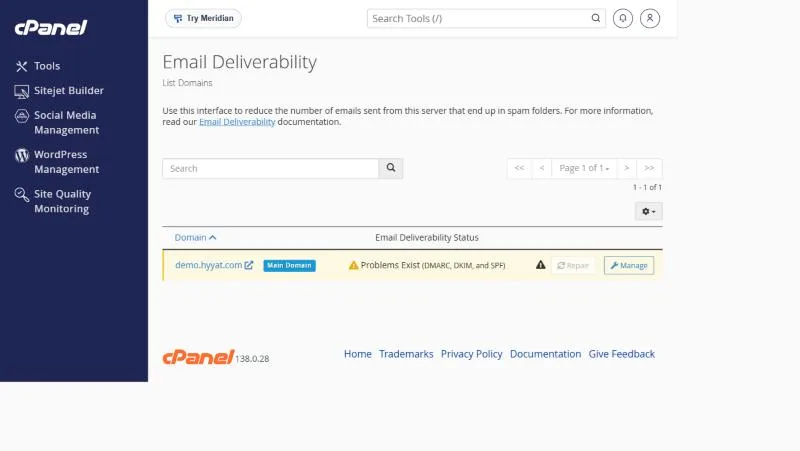
- Open Email Deliverability in the Email section of cPanel.
- Look at the status column next to each domain. Problems Exist means one or more records are missing or wrong.
Fixing the problem #
If your nameservers are with us: click Repair and cPanel adds the correct records automatically.
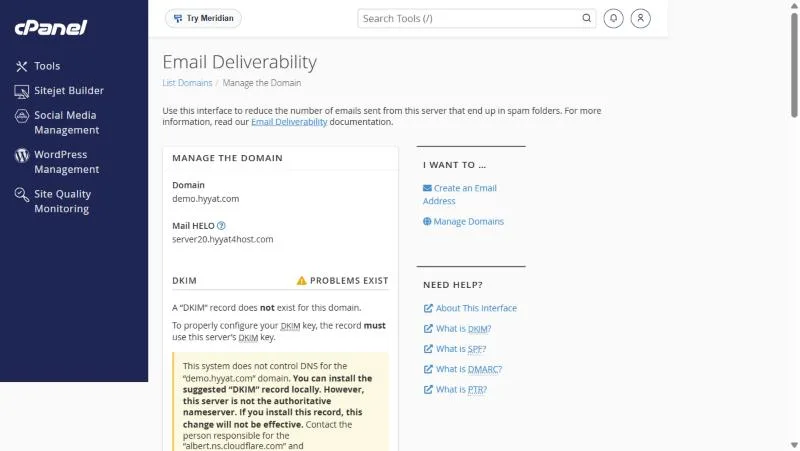
If they are at Cloudflare or elsewhere: click Manage. You will see a notice that this server does not control DNS for your domain, plus the suggested records. Copy each record and add it as a TXT record in that provider’s DNS panel.
After adding the records #
- Wait a little for DNS to update, then reopen Email Deliverability.
- Problems Exist should disappear and the records show as valid.
- Never add two SPF records for one domain. If an old one exists, edit it instead.
Common mistakes with email records #
- Two SPF records for one domain: both become invalid. Merge them into one.
- Forgetting to add a service that sends as you (such as Google or a newsletter platform) to SPF.
- Adding records in cPanel while the domain DNS is at Cloudflare, so they have no effect.
- Copying an incomplete DKIM record. Use the copy button on the page.
- Turning on a strict DMARC reject policy before SPF and DKIM are confirmed valid.
Cases we have seen #
- A domain on Cloudflare: the customer clicked Repair in cPanel and nothing changed, because DNS lives in Cloudflare. Copying the records there fixed it.
- A customer had two SPF records in DNS, an old one and a new one. A domain must have exactly one SPF record, so we merged them.
- A company sending from its site and from Google Workspace needed SPF to cover both, or one of them failed.
Mail reaches Gmail but still lands in Outlook Junk? That has its own causes, covered in the Outlook and Hotmail junk guide.
Frequently asked questions #
How do I enable SPF and DKIM in cPanel?
In Email Deliverability click Repair next to the domain, or add the suggested records in your domain DNS.
Why does Repair not work for my domain?
Your nameservers are with another provider such as Cloudflare. Add the records there.
Are SPF and DKIM enough?
Adding DMARC as well is recommended.
How long do the records take to apply?
Usually minutes to hours, depending on TTL and your DNS provider.
Do SPF and DKIM solve every spam problem?
They fix the two main causes, but message content and sender reputation also matter.
- The Email Section in cPanel: A Guide to Every Tool and When to Use It
- Why Do Your Website and Business Emails Go to Spam? Causes and Step-by-Step Fixes
- What Is DMARC and How to Stop People Spoofing Your Company Email, Step by Step
- Track Email Delivery in cPanel: Did Your Message Arrive, and Why Was It Rejected?


