

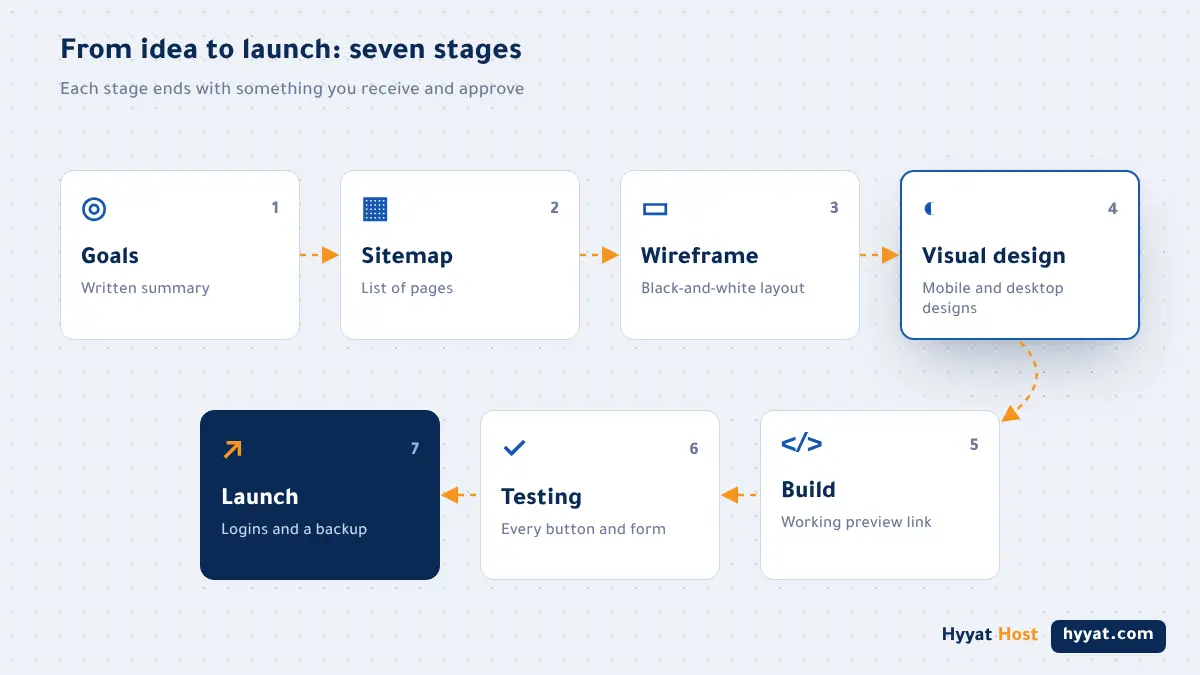
When a business owner orders a website, they often picture the designer opening a design tool and drawing the home page straight away. In practice, the best websites are built in clear stages. Each stage answers one question, and the project does not move on until that question is settled. This order is not paperwork for its own sake. It is the difference between a site delivered on time and a site stuck in a loop of changes.
This guide walks through the stages the way we actually run company website projects, and for each one explains what happens, what you need to provide, and what you receive at the end of it.
Stage 1: Understanding the business and the site goals #
Before anything is drawn, we need to understand what your company sells, who your customer is, and what you want a visitor to do when they land on the site. Call you? Request a quote? Download your company profile? Buy online? The answer shapes the whole website.
- The main goal: one primary action you want visitors to take, such as messaging you on WhatsApp or filling in a form.
- The audience: individuals or businesses, local or international, one language or two.
- Available content: which texts, photos and brand files you already have, and what is missing.
What we need from you: one focused session and a few examples of websites you like. We listed everything worth preparing in what to prepare before designing your company website.
Stage 2: The sitemap #
Here we decide which pages the site needs and how they connect: home, about, services, a page for each service, portfolio and contact. A sitemap looks simple, but it settles big questions early. Does each service deserve its own page? Do you need a blog? Will the site run in two languages?
If you are unsure which pages to include, see the pages a company website needs.
Stage 3: The wireframe #
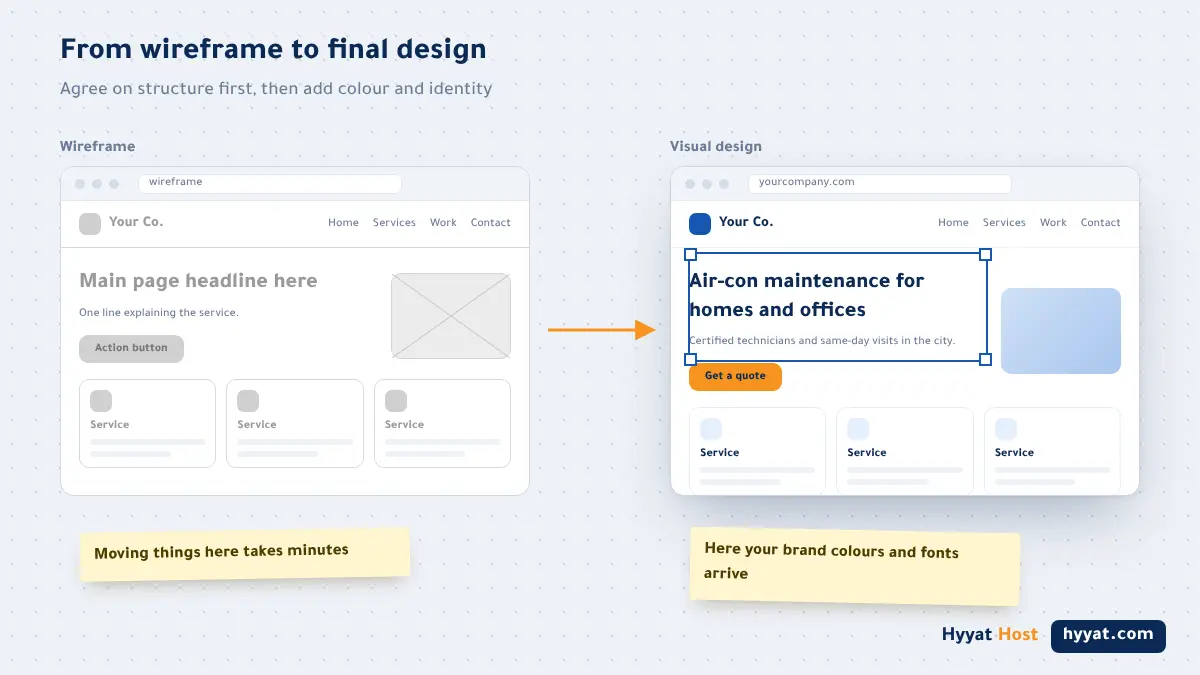
A wireframe is a black-and-white sketch of each page that fixes where every element goes: headings, images, buttons and forms, without final colours or fonts. The point is to agree on structure and content before anyone gets distracted by visuals.
Stage 4: Visual design (UI) #
Once the wireframe is approved, the stage everyone notices begins: colours, typography, imagery, icons and button styles. This is where your brand identity is applied to the website. Usually the core templates are designed first, the home page and one inner page, and the remaining pages follow the same system.
- The design is presented as images or a clickable prototype, not a working site.
- Your feedback is collected in one organised message rather than scattered rounds.
- The mobile layout is considered from the start, not after the desktop version is finished.
If your company does not have a defined identity yet, read website visual identity before this stage.
Stage 5: The build #
The approved design becomes a working website, on WordPress or as custom development depending on the project. Forms are connected to your email, WhatsApp and call buttons are added, and pages are prepared for search engines with proper titles, descriptions and links.
The difference between what happens at the design stage and what happens here is covered in web design vs web development.
Stage 6: Testing and review #
Before launch, the site is opened on different browsers and devices, and every form, button and link is tested. We also ask you to proofread the text yourself, because nobody knows your service names and phone numbers better than you.
| What is tested | How |
|---|---|
| Mobile and desktop | Open every page on a phone and a computer and check that text and buttons are clear. |
| Forms | Send a test from every form and confirm it reaches your inbox. |
| Links | Click every link in the menus and footer and make sure no page is empty. |
| Speed | Check that images are compressed and that nothing heavy is loaded without need. |
Stage 7: Launch and follow-up #
The site is moved to your domain and hosting, HTTPS is enabled, and the site is added to Google Search Console. After launch come the follow-up weeks: fixing small issues that only appear with real use, and making sure form messages arrive.
Because a website needs a fast and secure home, choosing hosting is part of the launch, not an afterthought. For WordPress sites in particular, see WordPress hosting.
Why we do not skip stages #
Jumping to visual design before the pages are agreed, or to development before the design is approved, feels faster at first but sends you backwards later. Every stage is approved in writing, so if a major change comes afterwards, its effect on time and cost is clear and there is no dispute.
What you receive at the end of each stage #
To know where your project stands at any time, ask for each stage to end with a clear deliverable that is sent to you and approved:
| Stage | What you receive |
|---|---|
| Discovery and goals | A written summary of the site goals, audience and scope. |
| Sitemap | The list of pages and their order in the menu. |
| Wireframe | A black-and-white layout of each key page. |
| Visual design | Page designs for desktop and mobile. |
| Build | A working preview link before launch. |
| Launch | Logins for the website, hosting and domain, plus a backup. |
The stages at a glance #
- Discovery and goals → sitemap → wireframe.
- Then visual design → build → testing → launch.
- Approving each stage before the next is what protects your time and budget.
Ready to start? See our website design service, and if your site runs on WordPress, see WordPress website design.
Frequently asked questions #
What is the first stage of designing a company website?
Understanding the business and the site goals: what you sell, who your customer is, and which action you want visitors to take. Everything else is built on those answers.
What is a wireframe?
A simple black-and-white sketch of each page showing where headings, images, buttons and forms go, before colours and final design.
Can I make changes after the design is approved?
Yes, but a major change after approval affects the timeline and may affect the cost. That is why feedback is collected and each stage is approved before moving on.
When do I see the site working?
During the build stage. Before that, you see wireframes and designs as images or a clickable prototype.
Are hosting and the domain part of the design process?
Yes, at the launch stage, and it is best to prepare them early, with the domain registered in your own name.
- What to Prepare Before Designing Your Company Website: Content, Images and Domain
- What Pages Does a Company Website Need? And What Goes on Each Page
- Website Visual Identity: Colours, Fonts and Logo, and How to Apply Them Consistently
- Web Design vs Web Development: Who Does What, and When You Need Each
- Ready-Made Template or Custom Design? How to Choose for Your Company Website


