

The problem #
Your domain suddenly stops working, and instead of your website you see a page that says: You have reached a domain that is pending ICANN verification.
Why it happens #
ICANN, the organization that manages domain names worldwide, requires registrars to verify the email address of every domain owner. Since January 2014, a verification email is sent when a domain is registered or when the owner’s contact details change. The owner must click the link in that email.
When we register a domain for you and then update its contact details to your own, this verification is triggered. If the email is not verified within 15 days, the domain is suspended and shows this page until the email is verified.
How to fix it #
1. On the suspension page, follow the instructions shown.
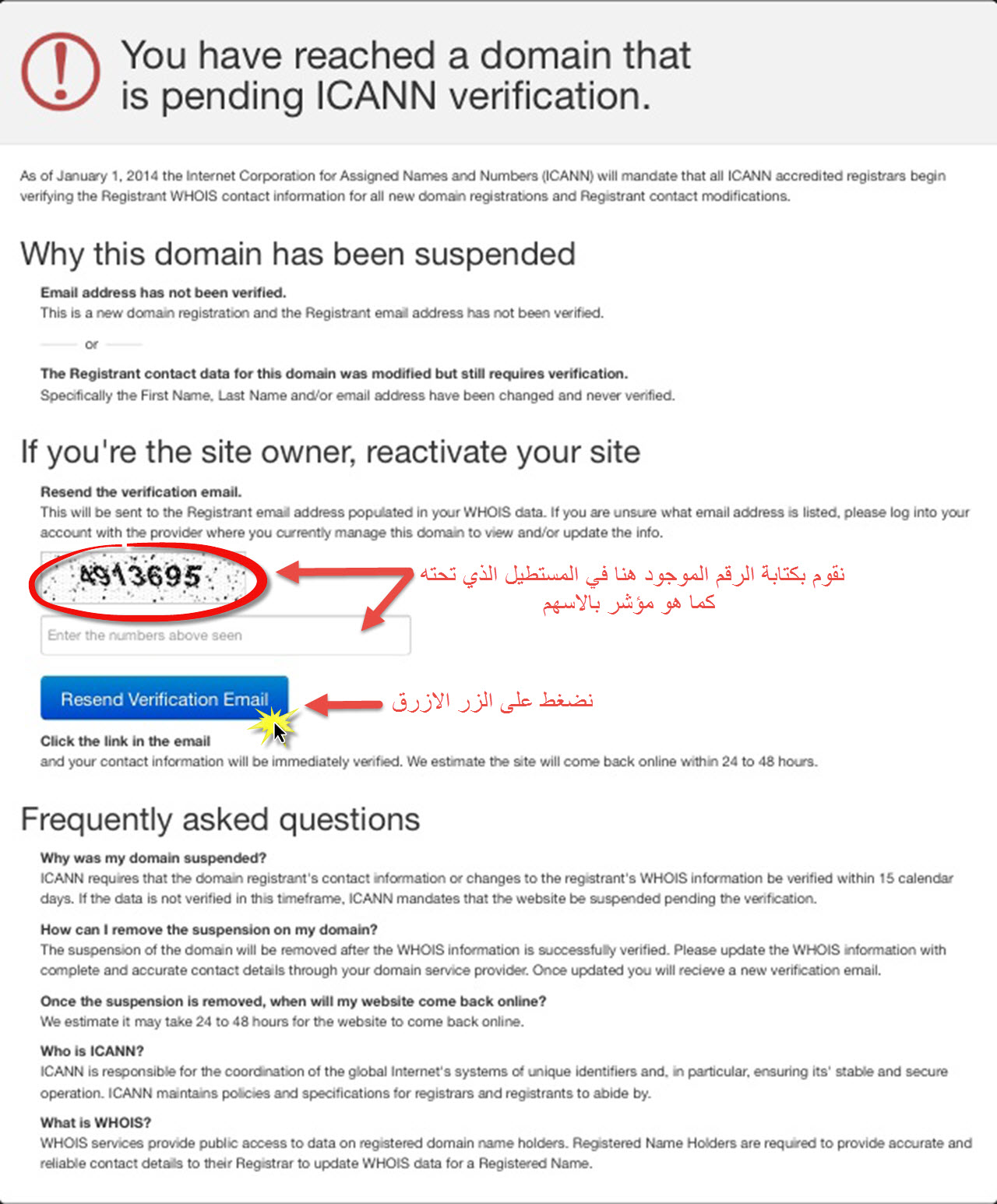
2. Enter the number code shown into the empty box and click Resend Verification Email.
3. Check the email address registered as the domain owner. You will find a verification message in English. Click the link inside it to confirm the email.
The domain returns to work shortly after verification. To avoid this, check your email within minutes of registering a domain or changing its contact details.
What if the email address is wrong? #
Update the domain owner’s email in your client area first (Domains, then Manage Domain, then Contact Information), then request the verification email again.
Related service: Hyyat Host domain registration with Arabic support 24/7.


