

In short: Open https://yourdomain.com/cpanel or https://yourdomain.com:2083 in your browser (replace yourdomain.com with your domain), then enter your cPanel username and password. You can also log in with one click from the client area without a password.
Method 1: Log in directly #
- In your browser, open one of these addresses, replacing example.com with your domain hosted with us:
- https://example.com/cpanel
- https://example.com:2083
- Enter your cPanel username and password (sent in your hosting welcome email) and click Log in.
Method 2: One-click login from the client area #
Log in to the client area, open your hosting service and click Log in to cPanel. See how to access cPanel from the client area.
What is the SSL connection? #
The https in the address means the connection between your browser and cPanel is encrypted with SSL, so your login details can’t be read on the network. With http, data travels unencrypted.
Seeing a security certificate warning? #
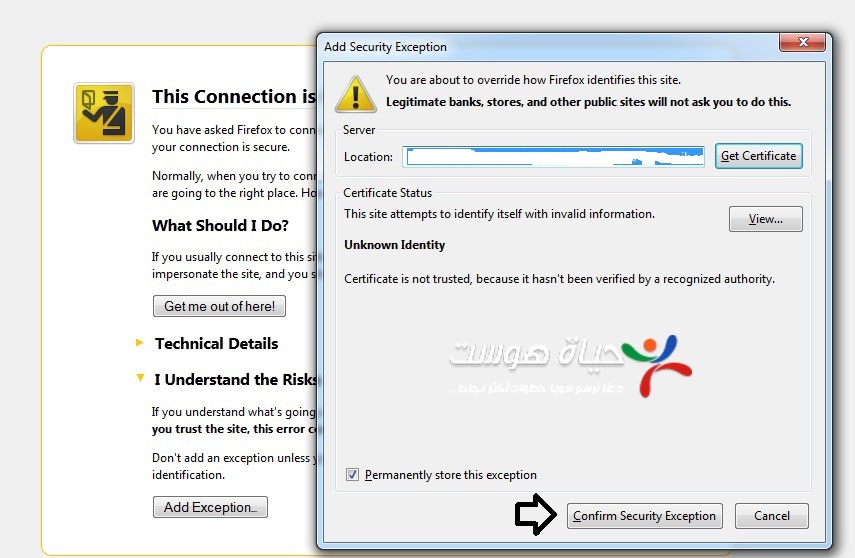
Current browsers show a warning if the certificate doesn’t match the address you typed, for example when you open cPanel by the server IP address. Use your own domain in the address as shown above. If the warning still appears, don’t continue: contact our support team and we will check the certificate for your domain.
Security tips #
- Use a strong password and never share your cPanel login; cPanel controls your whole website.
- If you forgot the password, you can change it from the client area (see this guide).
Related service: shared hosting plans from Hyyat Host, with 24/7 support.


