

A password can be guessed or leaked. SSH keys are a stronger solution: a pair of keys, a public one you put on the server and a private one that stays on your device alone. No one gets in without the private key, so you enjoy secure login with no password typing.
First: create the key pair on your device #
On your device (Windows, Mac or Linux) open the terminal and run the key-generation command; it creates two files: the private key and the public key (ending in .pub). Open the .pub file and copy its full content.
Second: add the public key in the panel #
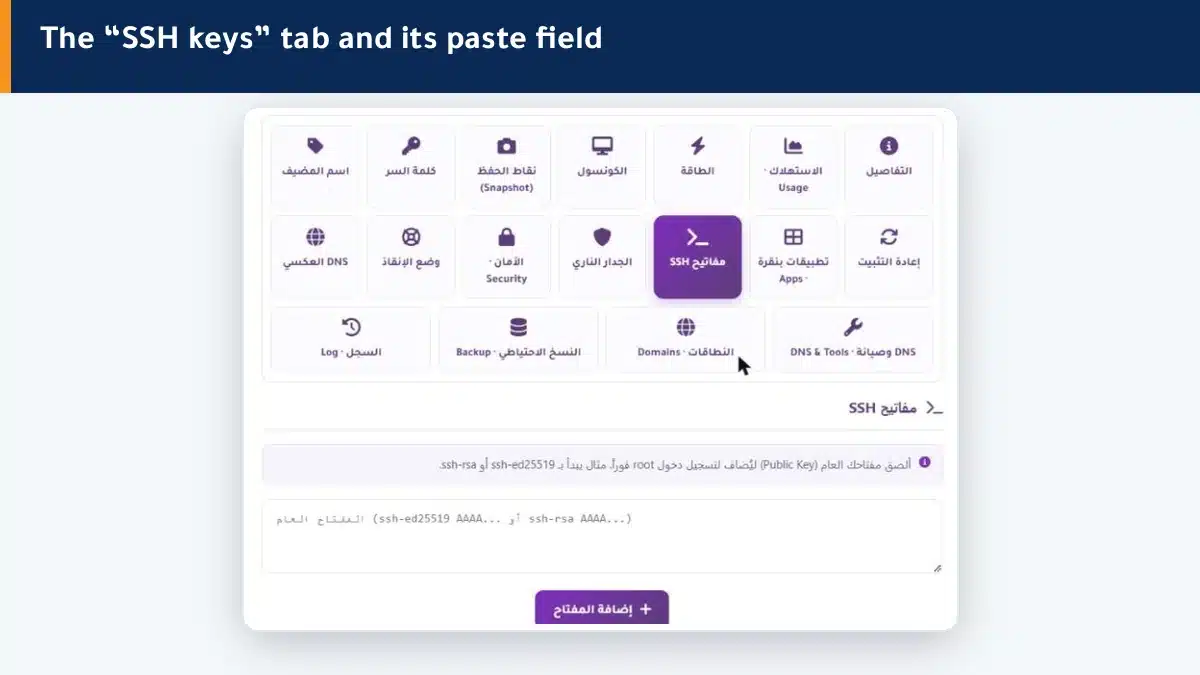
- Open the SSH keys tab in the control panel.
- Paste the public key (it starts with ssh-ed25519 or ssh-rsa) into the field.
- Click Add key — it is added to the root account instantly.
After that you log in to your machine over SSH with the private key and no password typing.
Key or password? #
Keys are best because they are far stronger than a password. You can keep a password for emergencies through the Console, but make daily login use keys.
Summary #
- An SSH key gives secure login with no password.
- Create the pair on your device, and paste only the public key in the panel.
- The private key is your secret — never share it.
Harden further by setting your machine firewall.
Frequently asked questions #
What is an SSH key?
A pair of keys: a public one you put on the server and a private one that stays on your device. It allows login with no password and is more secure because it is not guessed or typed each time.
Which key do I paste in the panel?
The public key only (the file ending in .pub, starting with ssh-ed25519 or ssh-rsa). Never paste the private key.
How do I create an SSH key?
Open the terminal on your device and run an SSH key-generation command; it creates two files, private and public. Copy the public (.pub) file content and paste it in the panel.
Can I drop the password after adding the key?
You can for daily login. It is best to keep a password for emergencies through the console, while making regular login use keys.
I lost my private key, what do I do?
Create a new pair on your device and add the new public key in the panel. A lost private key cannot be recovered.


