

In shortIn cPanel open Mailing Lists. Enter the List Name and a password to manage it, choose Public or Private access, then click Add. Then add members, and any message sent to the list address reaches all of them.
A customer asked: “We want to send internal notices to all staff from one address, without typing 30 addresses each time.”
A mailing list is a single address, such as [email protected], that delivers every message to all its members. Useful for a work team, a customer group or club members.
Creating the list #
- Open Mailing Lists in the Email section of cPanel.
- Type the list name, such as team, and pick the domain if you have several.
- Set a password for managing the list, or use Password Generator.
- Choose the access type, Public or Private.
- Click Add and it appears under Current Lists.
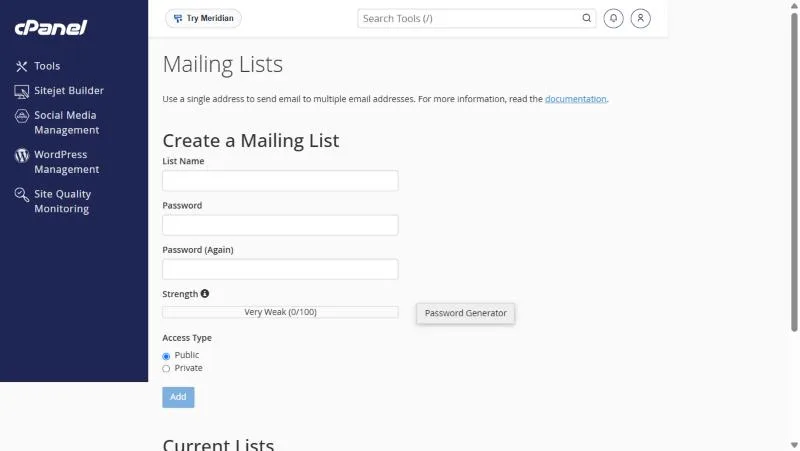
Public or private? #
| Type | Meaning |
|---|---|
| Public | The list is shown on the lists page and anyone can ask to join |
| Private | It is hidden and joining needs the administrator’s approval |
Adding members and settings #
Under Current Lists click Manage next to the list to open its admin panel, where you add addresses and choose who may post to the list.
Mailing list or forwarder? #
| Mailing list | Forwarder | |
|---|---|---|
| Recipients | Many | A few |
| Subscribe and unsubscribe | Yes | No |
| Who can send | You control it | Anyone who emails the address |
Not for bulk marketing. Shared hosting has an hourly sending limit, and bulk mail to people who did not sign up hurts your domain’s reputation. For large campaigns use a dedicated newsletter service.
Good uses for mailing lists #
- A list for your internal team for announcements.
- A list for committee or club members to exchange messages.
- A list for customers who signed up for service updates themselves.
- Restrict posting to the administrator if the list is for announcements only.
Cases we have seen #
- A school created a private list for teachers; the head writes to it and everyone gets the message, while non-members cannot post.
- A customer used a list for a marketing newsletter to thousands of customers and hurt his domain reputation. Lists suit internal and small groups.
- A company needed an address reaching only three people, and a forwarder was simpler than a full list.
For three or four people a forwarder is enough and simpler to manage than a list.
Frequently asked questions #
What is a mailing list?
A single address that delivers each message to all list members.
Can I use it for marketing?
It is not recommended: hosting has a sending limit and bulk mail hurts your domain’s reputation.
How do I add members?
Under Current Lists click Manage next to the list.
Can members see each other’s addresses?
That depends on the list settings in its admin panel.
Can I delete the list later?
Yes, from Current Lists next to the list.


