

After setting up your server, you want your site to work on your domain name like example.com instead of the machine address. The way is simple: you tell your domain to point to your machine through an A record. The Domains tab gives you everything you need.
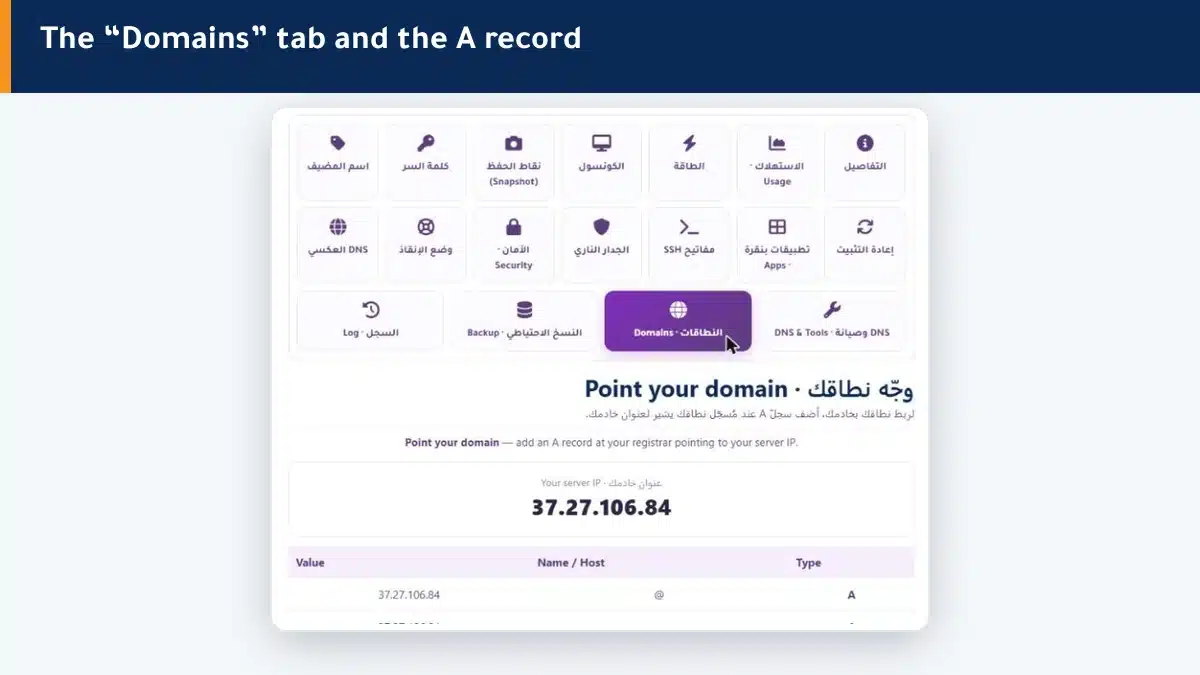
How do I point my domain? #
- Open the Domains tab — your server address (IP) appears.
- Go to your domain registrar panel (where you bought the domain).
- Add an A record for the name @ pointing to your server address.
- Add another A record for the name www pointing to the same address.
After saving at your registrar, your domain starts pointing to your machine. Propagation may take minutes to hours.
Summary #
- Add an A record at your registrar pointing to your server address.
- Add it for both names @ and www.
- Wait for the change to propagate (minutes to hours).
After connecting the domain, set up your site quickly with one-click apps.
Frequently asked questions #
How do I connect my domain to my server?
Add an A record at your domain registrar pointing to your server address (IP) shown in the Domains tab, for both names @ and www.
Where do I add the A record?
At your domain registrar (where you bought the domain), in its DNS settings, not from the VPS panel.
How long until the site appears on my domain?
Usually minutes to a few hours for the change to propagate across internet servers.
What is the difference between @ and www?
@ represents your root domain (example.com), and www represents www.example.com. Add an A record for both so the site works either way.
Does Hyyat Host host my domain DNS?
This tab points you to add an A record at your registrar directly, which is the simplest and most efficient way for most cases.


