

Quick answerOpen Disk Usage in the Files section. You see every folder, its size and a bar showing its share. The longest bar is where to start cleaning; it is usually email, old backups or logs.
When hosting space runs out, many things stop quietly: email rejects new messages, WordPress cannot upload images and backups never finish. The Disk Usage page shows you quickly where the space went.
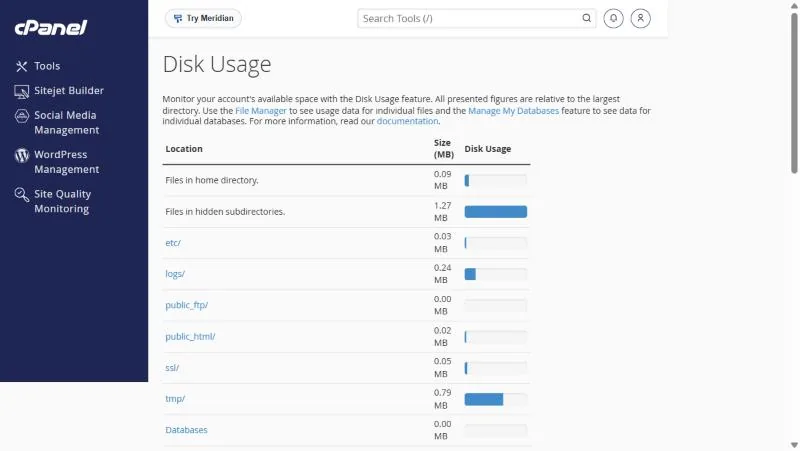
Reading the page #
| Row | What it means |
|---|---|
| Files in home directory | Files sitting directly in your home directory, outside any subfolder |
| Files in hidden subdirectories | Folders whose names start with a dot, such as the File Manager trash and config folders |
| public_html | Your website files |
| Every message in every mailbox | |
| logs and tmp | Archived logs and temporary files |
| Databases | Space used by your databases |
The bars are relative: the longest bar is your biggest folder, not a full disk. The space left on your plan is shown in the statistics panel on the cPanel home page.
Where space usually goes #
- Email: years of messages and attachments. See cleaning up email storage.
- Backups inside public_html: Zip files or backup plugin folders.
- File Manager trash: deleted files stay in
.trashuntil you empty it. - Logs: the
logsfolder if log archiving has been on for a long time. - Cache: cache folders created by some WordPress plugins.
Freeing space safely #
- Click the large folder’s name to see the smaller folders inside it until you find the cause.
- Open it in File Manager the link at the top of the page takes you there.
- Download what you need first any backup you might want later.
- Delete, then empty the trash deleting alone moves files to the trash and frees nothing.
Do not delete the whole
etc, mail or ssl folders; they hold email settings and certificates. Remove old content inside them with their own tools. To learn what each folder does, read cPanel folders explained.Frequently asked questions #
Why does this size differ from the statistics panel?
The page is refreshed periodically and some items are counted differently. The statistics panel is the reference for your plan limit.
I deleted files but the space did not change. Why?
They are probably still in the File Manager trash. Empty it.
Does email count towards hosting space?
Yes, messages in every mailbox count.
What if I genuinely need more space?
Upgrade your plan or move email to separate email hosting.
Related guides
- cPanel Folders Explained: public_html, mail, public_ftp and More
- View and Free Up Email Storage with Email Disk Usage in cPanel
- cPanel File Manager: Open It, Show Hidden Files, Change Permissions and More
- How to Monitor Your Website Resource Usage in cPanel
- Statistics and the Metrics Section in cPanel: Track Disk Space, Bandwidth, Errors and Resources


