

In shortIn cPanel open Track Delivery. Enter a recipient (optional) and click Run Report, or Show All. A table lists every message: sender, time, spam score, recipient and result (delivered, deferred, or failed with the reason). Data is kept for 10 days.
A customer asked: “I sent an important quote and the customer says it never arrived. How can I check?”
“I sent it and it never arrived!” Before guessing, ask the server. Track Delivery shows the route of every incoming and outgoing message, its result and the failure reason if it failed.
Running the report #
- Open Track Delivery in the Email section of cPanel.
- Enter the recipient email to trace mail to one address, or leave it empty.
- Click Run Report, Show All, or Show Blocked & Failed to see only problems.
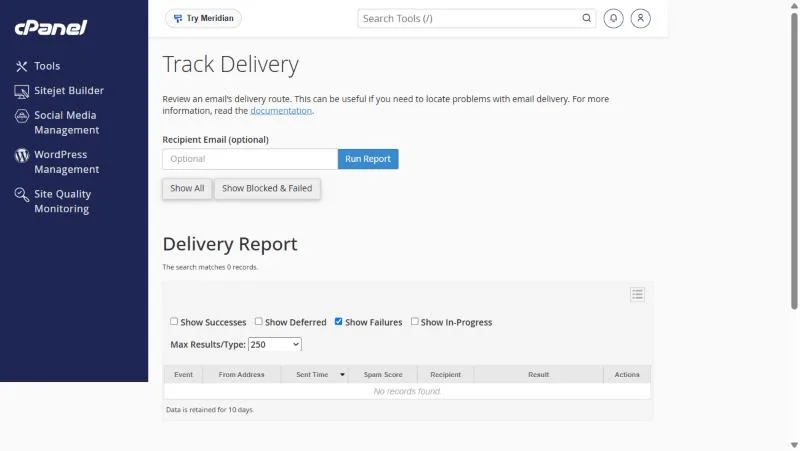
Reading the table #
| Column | Meaning |
|---|---|
| Event | Success, deferral or failure |
| From Address | The sender |
| Sent Time | When it was sent |
| Spam Score | The SpamAssassin score of the message |
| Recipient | The address it was sent to |
| Result | The server message: the failure reason or a delivery confirmation |
The filters above the table control what is shown: successes, deferrals, failures and in-progress. Tick them all to see the full picture.
Common failure reasons #
| The result says | Likely cause | Fix |
|---|---|---|
| User unknown / No such user | The recipient address is wrong or does not exist | Check the spelling |
| Mailbox full / quota exceeded | The recipient mailbox is full | If it is yours, increase storage |
| Rejected / blocked / spam | The receiving server refused it | See SPF and DKIM |
| Deferred | The receiving server is busy and delivery will be retried | Wait |
Data is kept for only 10 days. Trace a problem soon after it happens.
Before opening a support ticket #
- Run the delivery report and copy the Result text exactly.
- Check that the recipient address is spelled correctly.
- Ask the recipient to check their spam folder.
- Include in your ticket: sender, recipient, sent time and the result text.
Situations that keep coming up #
- A customer sent to an address with one wrong letter; the report showed a “user unknown” rejection. Correcting the address settled it.
- A message to a major client showed Accepted in the report, so the client checked spam and found it there.
- A company saw repeated rejections from one server because of SPF policy, and fixed its records in Email Deliverability.
Repeated rejections over SPF or DKIM? Fix them in Email Deliverability before resending.
Frequently asked questions #
How do I check whether my message arrived?
In Track Delivery in cPanel, run the report and check the Result column.
What does Deferred mean?
The receiving server did not accept it yet, and the server will retry automatically.
How long does cPanel keep the delivery log?
10 days.
Does it show incoming mail too?
Yes, the report covers incoming and outgoing mail on your account.
Why can’t I find a message from two weeks ago?
Because the log is kept for 10 days only.
Related guides


