

Google Workspace (formerly G Suite and Google Apps) gives you Gmail with addresses on your domain. You can keep your website with us and move only the email to Google. The key is the MX record, which decides where your domain mail is received.
Before you start #
- Sign up for Google Workspace and verify the domain as Google asks in its console.
- Create the users in Google with the same names as your current addresses.
- If you have important mail on the hosting, move it to Google before switching.
Step 1: MX records #
- Open Zone Editor in the Domains section of cPanel.
- Click Manage next to your domain and show the MX records.
- Delete the old MX records that point to your hosting.
- Add an MX record with the value Google gives you in its setup. Google currently asks for one record: smtp.google.com with priority 1.
Step 2: Email Routing #
Open Email Routing in the Email section, choose Remote Mail Exchanger and click Change. This tells the hosting server that your domain mail is not stored here, so mail from your website (such as contact forms) goes to Google, not to a local mailbox.
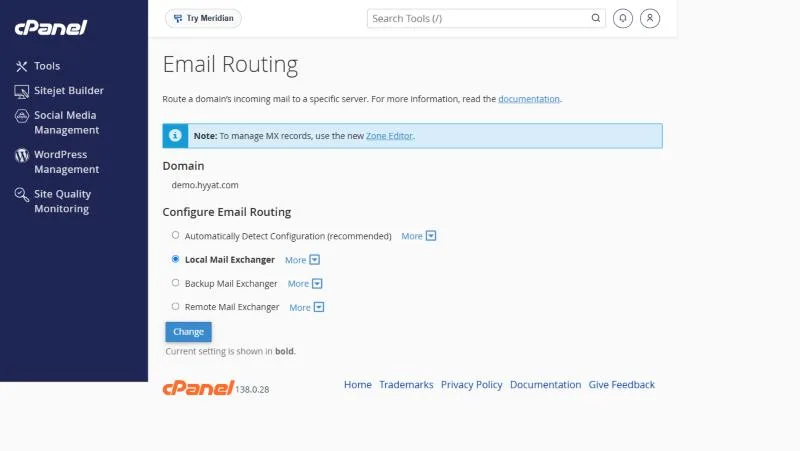
| Option | When |
|---|---|
| Local Mail Exchanger | Email is on our hosting (default) |
| Remote Mail Exchanger | Email is at Google Workspace or Microsoft 365 |
| Backup Mail Exchanger | Our hosting is a backup for another provider |
| Automatically Detect Configuration | cPanel decides based on your MX records |
Step 3: the SPF record #
Add include:_spf.google.com to your domain’s SPF record so Gmail messages do not land in spam. If your website also sends mail from the hosting, keep the server in the same record. Never create two SPF records. See SPF and DKIM.
Things to know before switching #
- After changing MX, new mail starts arriving at Google; old mail stays on the hosting.
- The full switch can take a few hours while DNS updates, so do not delete hosting email right away.
- Keep the old mailboxes until you are sure all mail is arriving at Google.
- The same steps work for Microsoft 365, with the MX record Microsoft gives you.
Examples from customer tickets #
- A company changed the MX records but forgot to set Email Routing in cPanel to Remote Mail Exchanger, so mail from its own website was still delivered locally.
- A customer deleted the hosting mailboxes before moving old mail to Google. Move the mail first with Google’s import tool.
- A domain on Cloudflare: MX records added in cPanel had no effect. Records go wherever DNS is actually managed.
Weighing Google Workspace against hosting email? Our email hosting vs business hosting comparison helps you decide.
Frequently asked questions #
What is the Google Workspace MX record?
Google currently asks for one record: smtp.google.com with priority 1. Use the value shown in your Google console.
Does moving email to Google affect my website?
No, the website stays on the hosting; only where mail is received changes.
Why do contact form emails stop arriving after the move?
Usually Email Routing was not changed to Remote Mail Exchanger.
Can I switch back to hosting email later?
Yes, by pointing MX back to the hosting and choosing Local Mail Exchanger.
Do these steps work for Microsoft 365?
Yes, using Microsoft’s own MX and SPF records.


