

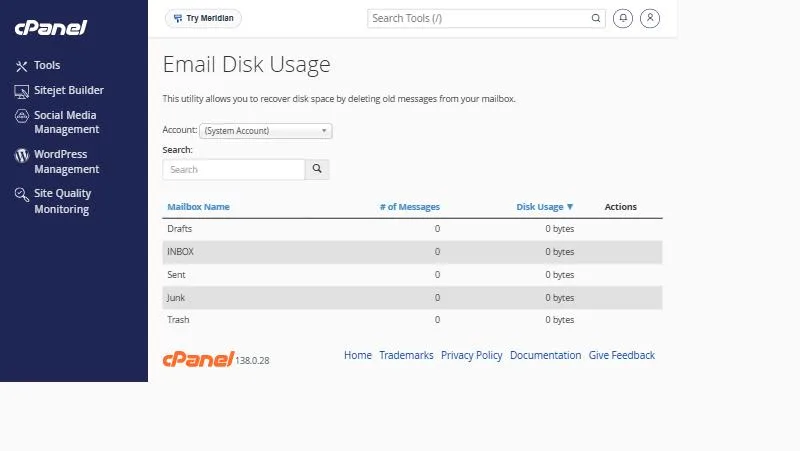
In shortIn cPanel open Email Disk Usage and pick the mailbox. You see each folder (INBOX, Sent, Trash, Junk and Drafts) with its message count and disk usage. Click Manage next to a folder to delete messages older than a period or larger than a size.
A customer asked: “The manager’s mailbox says it is full, and we do not know what is filling it.”
A full mailbox stops receiving mail. Often the space is in folders we forget about: sent mail with attachments, the Trash and the spam folder. Email Disk Usage reveals and cleans this up from cPanel.
Find out where the space goes #
- Open Email Disk Usage in the Email section of cPanel.
- Pick the mailbox from the Account list.
- Review the table of message counts and space per folder. Sort by Disk Usage to see the largest first.
Deleting old mail #
- Click Manage in the Actions column next to the folder.
- Choose what to delete, such as mail older than a year, larger than a size, or everything.
- Confirm and wait a moment for it to finish.
Deleting here is permanent. It does not go to Trash. If a folder holds important mail, move or save it first.
Where to look first #
| Folder | Why it grows |
|---|---|
| Sent | Everything you send, with attachments, is kept here |
| Trash | Some apps never empty it automatically |
| Junk / spam | Spam piles up if nobody clears it |
| INBOX | Years of old mail with large attachments |
After cleaning up #
- If you still need room, increase it with the mailbox quota.
- Use IMAP on your phone so deletions reach the server.
- To keep a permanent copy of mail, see email archiving.
Habits that keep your mailbox lean #
- Send large files as a download link instead of an attachment.
- Empty Trash and Junk monthly, or set your app to do it automatically.
- Save important attachments to your computer or cloud storage, then delete the message.
- Use IMAP on every device so mail stays in sync.
From our support desk #
- A sales manager’s mailbox was half Sent folder, full of PDF quotes. Deleting anything older than two years freed space without touching the inbox.
- A customer cleaned his inbox but forgot the Spam folder, which had grown past 2 GB over the years.
- A company now cleans up quarterly by deleting messages older than a set age in newsletter folders, and no longer needs bigger quotas.
After cleaning, see other ways to delete old mail, including Webmail with emptying the Trash.
Frequently asked questions #
How do I see what is using my email space?
In Email Disk Usage in cPanel, pick the mailbox and check each folder.
Does deleting in Email Disk Usage go to Trash?
No, it is permanent.
How do I delete mail older than a year?
Click Manage next to the folder and choose to delete messages older than that period.
Which folder usually uses the most space?
Usually Sent and INBOX because of attachments, then Trash.
Does deleting mail free hosting space immediately?
Yes, though the figures in cPanel may take a little while to update.


