

default._domainkey.yourdomain. If they match, the receiver knows the message really came from your domain and was not altered on the way.What DKIM proves, and what it does not #
| Proves | Does not prove |
|---|---|
| The message came from a server holding the domain’s key | That the content is not spam |
| The headers and body were not altered after sending | That the sender address the reader sees is honest; that is DMARC’s job |
DKIM, SPF and DMARC together #
| Record | Its question | Example |
|---|---|---|
| SPF | Is this server allowed to send for the domain? | v=spf1 +a +mx +ip4:203.0.113.10 ~all |
| DKIM | Is the message signed with the domain’s key and unaltered? | A TXT record at default._domainkey |
| DMARC | What should the receiver do if both fail, and where to send reports? | v=DMARC1; p=none; rua=mailto:... |
Gmail and Outlook now rely on all three to decide inbox or spam, especially for bulk senders. A domain without DKIM will often find its mail in spam.
Enabling it for every domain in WHM #
WHM › Email › Email Deliverability
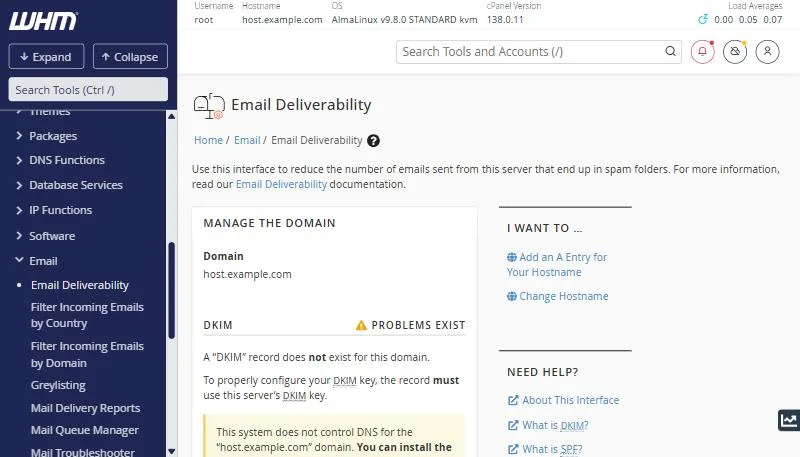
The tool lists every domain on the server with its DKIM, SPF and PTR state. If the domain’s DNS is on this server, Repair fixes the record in one click. If DNS is elsewhere, such as Cloudflare, the page shows the record value to copy there, as in the example in the screenshot.
To enable DKIM and SPF on every account at once there is Enable DKIM/SPF Globally under Email, and Tweak Settings has options to enable both automatically for new accounts.
For one domain in cPanel #
Site owners can enable it themselves in Email Deliverability in cPanel; the customer steps are in enabling SPF and DKIM in cPanel.
How to confirm it works #
- Send a message to Gmail then open it and choose Show original.
- Read the result look for
DKIM: PASSwith your domain beside it. - Or from the command line
dig TXT default._domainkey.example.com +shortshows the published public key.
Why DKIM fails #
| Cause | Fix |
|---|---|
| The record is not published at the external DNS provider | Copy it from Email Deliverability into the DNS panel |
| The record is cut off or has extra spaces | Some DNS panels split long values; make sure it is complete |
| An old key after moving the site | The new server has a different key, so update the record |
| The message passed through a service that changed it | Some mailing lists modify content and break the signature |
What a real DKIM record looks like #
default._domainkey.example.com. IN TXT "v=DKIM1; k=rsa; p=MIIBIjANBgkqhkiG9w0BAQEFAAOCAQ8AMIIBCgKCAQEA..."
| Part | Meaning |
|---|---|
default |
The key name (selector), which cPanel uses by default |
v=DKIM1 |
The standard version |
k=rsa |
The key type |
p=... |
The public key itself, which is very long |
The receiver knows which record to look up from the message’s DKIM-Signature header, which carries the domain d= and the selector s=.
DKIM questions #
Is DKIM alone enough for delivery?
No. It needs SPF, DMARC, an IP with a clean reputation and a correct PTR record alongside it.
Can a domain have more than one DKIM record?
Yes. Each sending service has its own key under a different selector, such as default for your server and google for Google.
Do I need to rotate the DKIM key?
It is not required, but rotating it periodically is good security practice for important domains.
- Enable SPF and DKIM with Email Deliverability in cPanel So Your Mail Avoids Spam
- Limiting Emails per Hour for Each Domain in WHM: Max Hourly Emails and Package or Account Limits
- Why Do Your Website and Business Emails Go to Spam? Causes and Step-by-Step Fixes
- Creating a New cPanel Account in WHM: Every Field in Create a New Account Explained


