

cPHulk is the guard at the login doors of a cPanel server: cPanel, WHM, Webmail, IMAP and POP3 mail, FTP and SSH. When it sees repeated failed logins from one address or against one account, it blocks them for a while. That protects the server from password-guessing attacks, but it sometimes catches a real customer who mistyped their password a few times, or a whole office behind a single IP.
- Access to WHM as root at
https://your-server-hostname:2087(or the server IP on port 2087). Avoid the old port 2086: it is not encrypted. - The IP address in question. The customer can find theirs on any what-is-my-IP site, or you will find it in the login history.
The tool #
WHM › Security Center › cPHulk Brute Force Protection
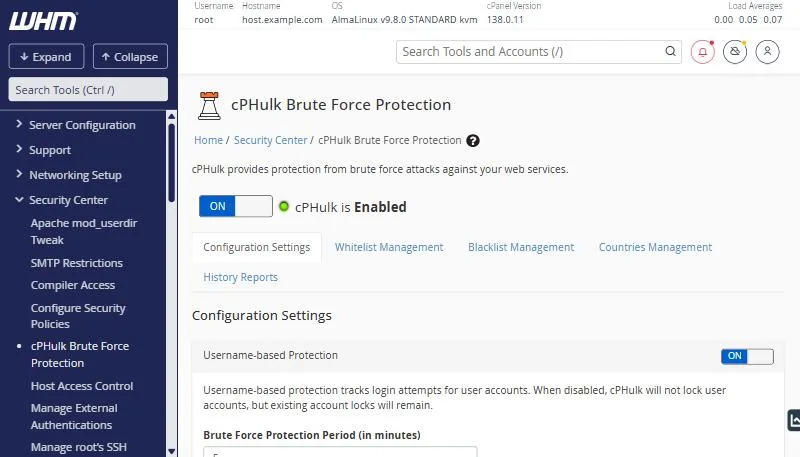
At the top is cPHulk’s on/off switch and status, then five tabs: Configuration Settings, Whitelist Management, Blacklist Management, Countries Management and History Reports.
Free tool from Hyyat Host
What is my IP?
See your public address, its type, country and reverse name in a second.
Whitelisting an IP #
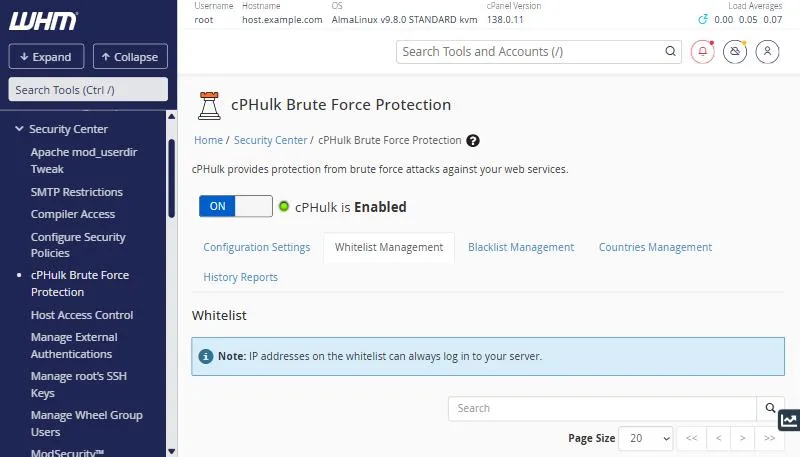
- Open Whitelist Management addresses here are never blocked, however many attempts fail.
- Enter the address in New Whitelist Records, one per line, optionally followed by a comment after #, for example
203.0.113.5 # head office. - Click Add the address appears in the whitelist table.
Blacklisting an IP #
Under Blacklist Management, the same way. Addresses here are always refused, even with the right password. Useful for an address that keeps attacking the server. Blocking whole countries lives under Countries Management; use it carefully so you do not lock out real customers while they travel.
Unblocking a customer #
- Open History Reports and choose to view the currently blocked addresses.
- Find the customer’s address or their username if the account itself is locked.
- Delete the entry with the delete button beside it; the customer can log in straight away.
Over SSH, /scripts/cphulkdwhitelist 203.0.113.5 whitelists an address. If the server also runs a firewall such as CSF, the block may come from there rather than cPHulk, so check both.
Tuning protection: the settings that matter #
| Setting | What it does | Note |
|---|---|---|
| Username-based Protection | Tracks failed logins per account and locks it for a while | Protects one account from guesses spread across many addresses |
| Maximum Failures by Account | Attempts allowed before the account locks | Too low annoys customers |
| Allow username protection to lock the “root” user | Lets root itself be locked | If you enable it, make sure your IP is whitelisted |
| IP Address-based Protection | Blocks an address after failed attempts | The core defence against attacks |
| One-day Blocks | A full-day block after a higher number of failures | For persistent attackers |
| Block IP addresses at the firewall level | Moves the block into the firewall | Stronger, but lifting it then involves the firewall too |
| Notifications | Alerts when root logs in from an unknown address | Turn it on; it is an important early warning |
- cPHulk shows Enabled.
- Your fixed address is whitelisted.
- The blocked customer can log in after the unblock.
cPHulk questions #
Which services does cPHulk protect?
cPanel, WHM, Webmail, mail over IMAP, POP3 and authenticated SMTP, FTP and SSH.
Is cPHulk a replacement for a firewall?
No, it complements one. cPHulk watches logins; a firewall controls ports and connections.
My own IP is blocked from WHM. How do I get in?
Log in over SSH or through the server console in your provider’s panel, and whitelist your address with the command above.
Will a customer be blocked for a wrong mail password on their phone?
Yes, if the failures repeat, and it is a common cause: a phone with an old saved password keeps retrying.
- Cannot Open Your Website or cPanel from Your Computer? Your IP May Be Blocked
- 5 Tips to Secure Your cPanel Server
- Changing a cPanel Account Password in WHM: When You Need It and What It Affects
- VPS Server Security: The Essential Steps After You Get Your Server
- cPanel and WHM on a VPS — The Complete 2026 Guide: What They Are, Licensing, and When to Choose Them


