

Terminating an account in WHM is not like moving a file to the bin. As soon as you confirm, the server removes everything that belongs to the account, and there is no undo. That is why this guide starts with what to do before deleting, then the steps themselves, whether it is one account or several at once.
Do you really need to delete it? #
| Situation | Better action |
|---|---|
| A customer has not paid | Suspend the account: everything is kept and one click restores it |
| A site you are moving to another server | Move it first, confirm it works there, then delete it here |
| An account that is finished for good | Take a full backup, keep it off the server, then delete |
| A test or duplicate account | Delete it directly |
- Access to WHM as root at
https://your-server-hostname:2087(or the server IP on port 2087). Avoid the old port 2086: it is not encrypted. - A full backup of the account stored off the server. Easiest is from the account’s own cPanel with a full cPanel backup, or from the command line with
/scripts/pkgacct username. - Confirmation that nobody is still using the domain for email.
Opening the tool #
WHM › Account Functions › Terminate Accounts
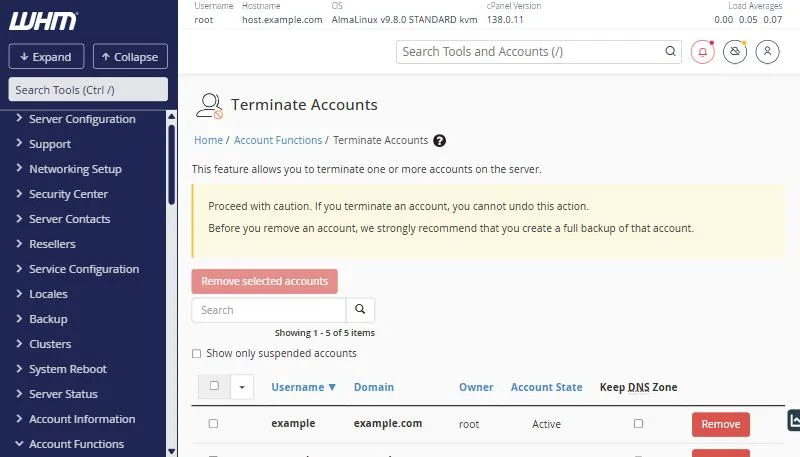
The page lists every account in a table: username, domain, owner, account state, a Keep DNS Zone checkbox and a Remove button on each row. Above it is an explicit warning that termination cannot be undone, with a recommendation to back up first.
Terminating a single account #
- Find the account with the Search box above the table.
- Decide about the DNS zone tick Keep DNS Zone if this server will still serve the domain’s DNS, for example because its mail is at Google. Otherwise leave it clear.
- Click Remove on that row.
- Confirm a confirmation dialog appears; after you accept, WHM shows the log until it finishes.
Terminating several accounts at once #
- Tick each account in the first column, or use the header checkbox to select everything shown.
- Use the filter Show only suspended accounts lists suspended accounts only, handy for clearing out lapsed customers.
- Review the list twice the counter above the table shows how many you selected.
- Click Remove selected accounts then confirm. Accounts are removed one after another with a status for each.
What exactly gets removed? #
- The whole account directory
/home/usernamewith every site file. - Its databases and database users.
- Mailboxes and their messages, forwarders and filters.
- Addon and subdomains and their web server configuration.
- The domain’s DNS zone, unless you ticked Keep DNS Zone.
- The system user, its logs and its cron jobs.
/backup), so you can restore from them later if automatic backups are on. See backup configuration in WHM and restoring an account.Problems you may hit #
| Problem | Cause and fix |
|---|---|
| The account is not in the list | You are logged in as a reseller who does not own it. Log in as root |
| The process stopped halfway | Usually a very large account. Let the log finish, then reload and check |
| The domain still shows a page after deletion | DNS or browser cache, or the domain points to another server. Check its A record |
- The account is gone from List Accounts.
- The backup is stored off the server and you know where.
- If you use billing software such as WHMCS, the service is marked terminated there too, so it is not recreated.
Questions before deleting #
Can I get an account back after terminating it?
Not from the termination tool. The only way back is restoring from an earlier backup.
What is Keep DNS Zone for?
It keeps the domain’s DNS records on the server after the account is gone, so mail or external services that rely on them keep working if this server is the domain’s nameserver.
Does termination free up a slot on the cPanel licence?
Yes. Terminated accounts no longer count towards the licence’s account total.
How many accounts can I terminate in one go?
The interface sets no practical limit, but accounts are removed one by one, so large batches take longer.
- Suspending and Unsuspending a cPanel Account in WHM: Manage Account Suspension
- How to Enable Automatic Backups in WHM (Backup Configuration)
- How to Restore a Full cPanel Backup (cpmove) in WHM
- Creating a New cPanel Account in WHM: Every Field in Create a New Account Explained
- cPanel and WHM on a VPS — The Complete 2026 Guide: What They Are, Licensing, and When to Choose Them


