

This pattern is very common. Microsoft judges mail more strictly and gives great weight to domain reputation and how recipients have treated it. So the same message lands in the Gmail inbox and in Outlook Junk. The general problem of mail going to spam is covered in why your emails go to spam; here we focus on Microsoft.
What Microsoft checks #
| Item | What it verifies | Where to fix it |
|---|---|---|
| SPF | That the sending server may send for your domain | Email Deliverability in cPanel |
| DKIM | That the message is signed and unaltered in transit | Email Deliverability in cPanel |
| DMARC | Your domain’s policy when the two checks fail | Zone Editor or your DNS manager |
| Domain reputation | Is the domain new? Has it sent spam? | Regular sending to engaged recipients |
| Content | Short links, odd attachments, image-only mail | Clear, plain messages |
Step 1: check SPF and DKIM #
- Open Email Deliverability in the Email section of cPanel.
- Look at your domain status if a problem shows, click Repair or Manage.
- If your domain uses Cloudflare copy the suggested records and add them there.
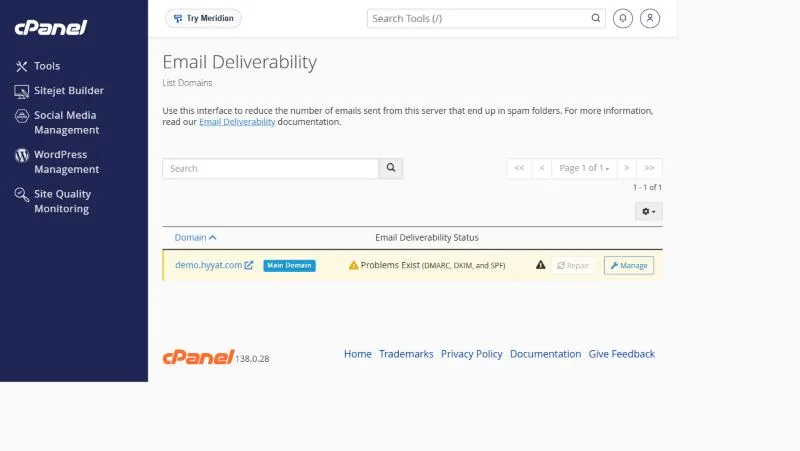
Step-by-step details: enabling SPF and DKIM with Email Deliverability.
Step 2: add a DMARC record #
Add a TXT record named _dmarc in your domain DNS. Start with a monitoring-only policy so your mail is not rejected:
v=DMARC1; p=none; rua=mailto:[email protected]
After a few weeks of confirming your mail passes both checks, you can tighten the policy. Change the address in the record to one you read.
Step 3: teach Microsoft your mail is wanted #
- Ask recipients to move your message from Junk to the inbox with Not junk.
- Ask them to add your address to contacts or safe senders.
- Send from a consistent address; do not change the sender each time.
- Do not send bulk mail from hosting email; use a dedicated sending service for newsletters.
Mistakes that make it worse #
| Mistake | Instead |
|---|---|
| A single image with no text | Clear text, with an image if needed |
| Links from URL shorteners | Full links to your own domain |
| A subject in capitals or with many exclamation marks | A natural subject describing the message |
| Hundreds of messages at once from a new address | A gradual increase in volume |
From our support desk #
- A new company saw all its first emails land in Hotmail Junk. After fixing DKIM and asking its first customers to move the messages, mail reached the inbox within weeks.
- A store sent invoices from a noreply address that took no replies, and recipients ignored them. Switching to a real address that accepts replies improved trust.
- A customer used a large image signature with no text, so his mail looked like an advert. A simple text signature helped it get classified correctly.
Frequently asked questions #
Why does Gmail accept my mail and Outlook not?
Each provider has its own standards, and Microsoft is stricter with new domains and unknown reputation.
Is DMARC necessary?
It raises trust a lot; start with p=none to monitor.
How long until delivery improves?
After fixing records it improves gradually as recipients engage, from days to weeks.
Is the hosting to blame?
Usually the domain settings or the content. The headers show the exact reason.
Can I send newsletters from hosting email?
For small numbers, yes; for large newsletters use a dedicated sending service so your domain reputation is not harmed.
How do I view a message’s headers in Outlook?
Open the message, choose view source or properties from the options menu, and copy the full text.
- Why Do Your Website and Business Emails Go to Spam? Causes and Step-by-Step Fixes
- Enable SPF and DKIM with Email Deliverability in cPanel So Your Mail Avoids Spam
- Delete Old Emails to Free Up Space: From Webmail, cPanel or Automatically
- Email Client Settings for Your Phone and Outlook: IMAP, POP3, SMTP and Ports
- The Email Section in cPanel: A Guide to Every Tool and When to Use It


