

You hire a developer to edit your theme, or want a colleague to upload images to one folder. Handing over your cPanel password opens everything: email, databases and domains. The answer is a separate FTP account per person that sees one folder only and is deleted when the job ends.
Creating the account #
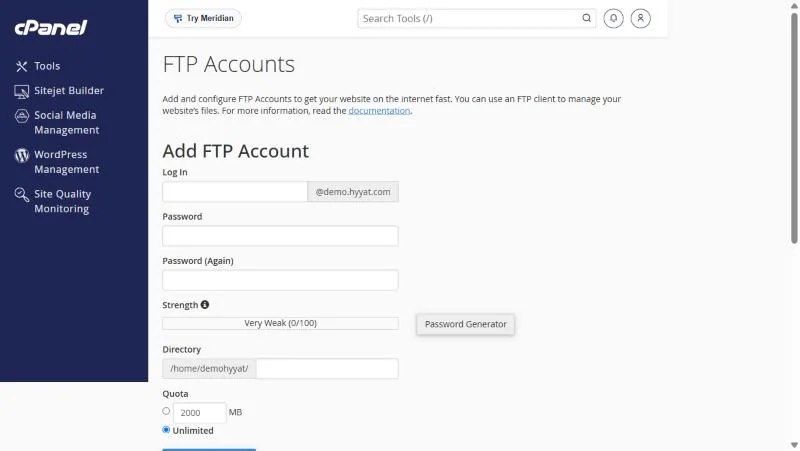
- Open FTP Accounts in the Files section of cPanel.
- Enter a log in name such as dev, which becomes [email protected]. Pick the domain if you have more than one.
- Set a strong password or click Password Generator and save it.
- Set the Directory the most important field, explained below.
- Choose a quota in megabytes or Unlimited.
- Click Create FTP Account the account appears in the list below.
The Directory field in detail #
cPanel suggests a folder named after the user inside your account. Change it to match what the person needs:
| They need access to | Enter in Directory |
|---|---|
| The whole website | public_html |
| Only the images folder | public_html/images |
| An addon domain site | That domain’s folder, for example shop.com |
| A separate file exchange folder | Keep the suggestion |
/ gives the account your whole home directory, including email and settings.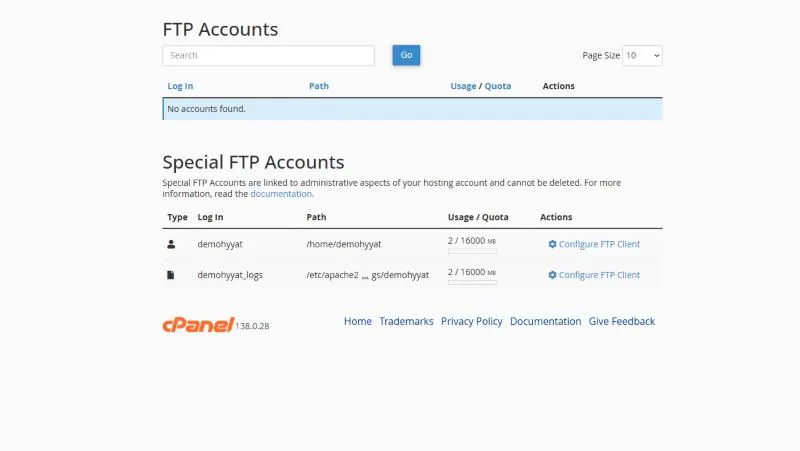
Managing the account later #
- Change the password or quota: from the Actions column next to the account.
- Connection details: click Configure FTP Client and send them over; see the FileZilla steps.
- When the job is done: delete the account. Deleting it does not touch the files it uploaded.
What about Special FTP Accounts? #
At the bottom of the page are two accounts that cannot be deleted: the main account, named after your cPanel user, which reaches everything, and the logs account. Never share the main account details.
Frequently asked questions #
Can an FTP user see my email or database?
No, only the folder set in the Directory field.
The developer forgot the password. What now?
Change it from the Actions column next to the account.
Does deleting an FTP account delete files?
No, only the account is removed; the files stay.
How many FTP accounts can I create?
It depends on your plan; the limit appears in the cPanel statistics panel.
- Upload Files to Your Hosting over FTP with FileZilla: Details, Steps and Error Fixes
- How to Password Protect a Folder in cPanel (Directory Privacy)
- cPanel File Manager: Open It, Show Hidden Files, Change Permissions and More
- How to Create a Strong Password and Store It Safely: A Password Manager Guide
- The Files and Databases Sections in cPanel: File Manager, FTP and Creating a Database


