

In shortIn cPanel open Email Accounts and click Manage next to the address. Under Storage you see current usage; enter the new size in Allocated Storage Space or choose Unlimited, then click Update Email Settings.
A customer asked: “I got a message that the mailbox is full, and customers say their mail bounces.”
When a mailbox is full, new mail stops arriving and the sender gets an error. The fix: increase the mailbox storage or delete old mail.
Changing the mailbox storage #
- Open Email Accounts in cPanel. Each mailbox shows used and allocated storage and a percentage.
- Click Manage next to the address.
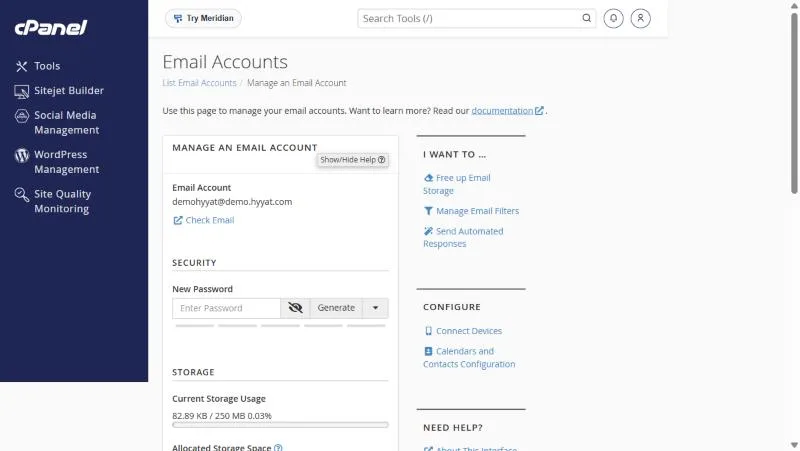
- Scroll to Storage where Current Storage Usage shows what is used now.
- Change Allocated Storage Space by typing the new size and unit (MB or GB), or choose Unlimited.
- Click Update Email Settings at the bottom of the page.
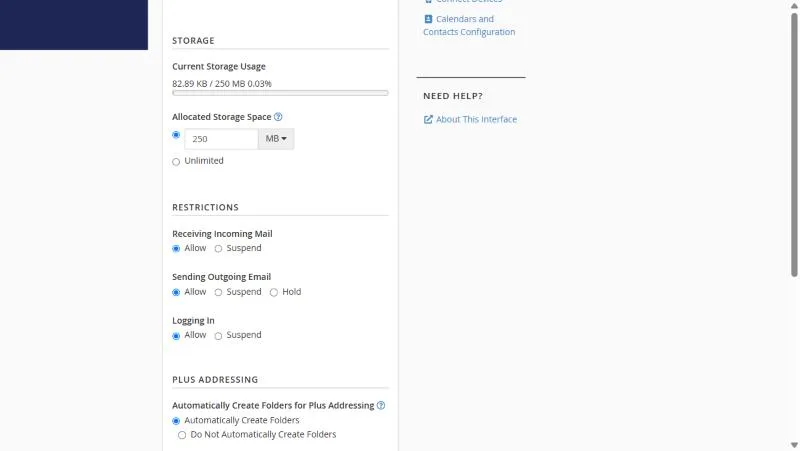
Important: email storage is part of your total hosting disk space. Unlimited means the mailbox could use all of it. Keep an eye on it with Email Disk Usage.
Increase storage or clean up? #
| Situation | Best option |
|---|---|
| Full of old mail and large attachments | Delete old mail with Email Disk Usage |
| You need every message and hosting space is free | Increase the mailbox storage |
| The hosting account itself is full | Clean up or move to a bigger plan |
Still full after changing the quota #
- I changed the quota but my app shows the old size: some apps refresh after a resync. Close and reopen the app.
- Space does not drop after deleting on my phone: with POP3, deletions do not reach the server. Use IMAP or delete in Webmail.
- Senders get a mailbox full error: the mailbox hit its limit. Increase storage now or delete old mail.
How much storage does a mailbox need? #
- A normal mailbox without many attachments usually needs little.
- Sales and accounts mailboxes need more because of attachments.
- Watch the percentage next to each mailbox in Email Accounts and increase storage before it fills.
- If all mailboxes together approach your hosting space, consider a bigger plan or separate email hosting.
Examples from customer tickets #
- A customer raised the quota, but the whole hosting space was full too, so mail still bounced. A mailbox quota cannot exceed the space left in the account.
- A customer raised her quota three times in a year. A clean-up showed the Sent folder alone held half the space.
- A company made every mailbox unlimited and could not tell which one filled the hosting. Set quotas made the problem show early, in one mailbox.
Before raising the quota again, try cleaning up with Email Disk Usage; if your team needs large mailboxes, look at Email Hosting.
Frequently asked questions #
How do I increase mailbox storage in cPanel?
Email Accounts, then Manage, change Allocated Storage Space and click Update Email Settings.
What happens when a mailbox is full?
New mail stops arriving and the sender gets an error.
Should I choose Unlimited?
You can, but it counts toward your whole hosting space, so monitor it.
Does increasing mailbox storage add hosting space?
No, it allocates part of your existing hosting space.
Where can I see each mailbox usage?
On the Email Accounts page, next to each address.


