

The DNS & Tools tab is two simple maintenance tools for your machine: setting the DNS servers it asks when turning domain names into addresses, and cleaning old logs that use the disk.
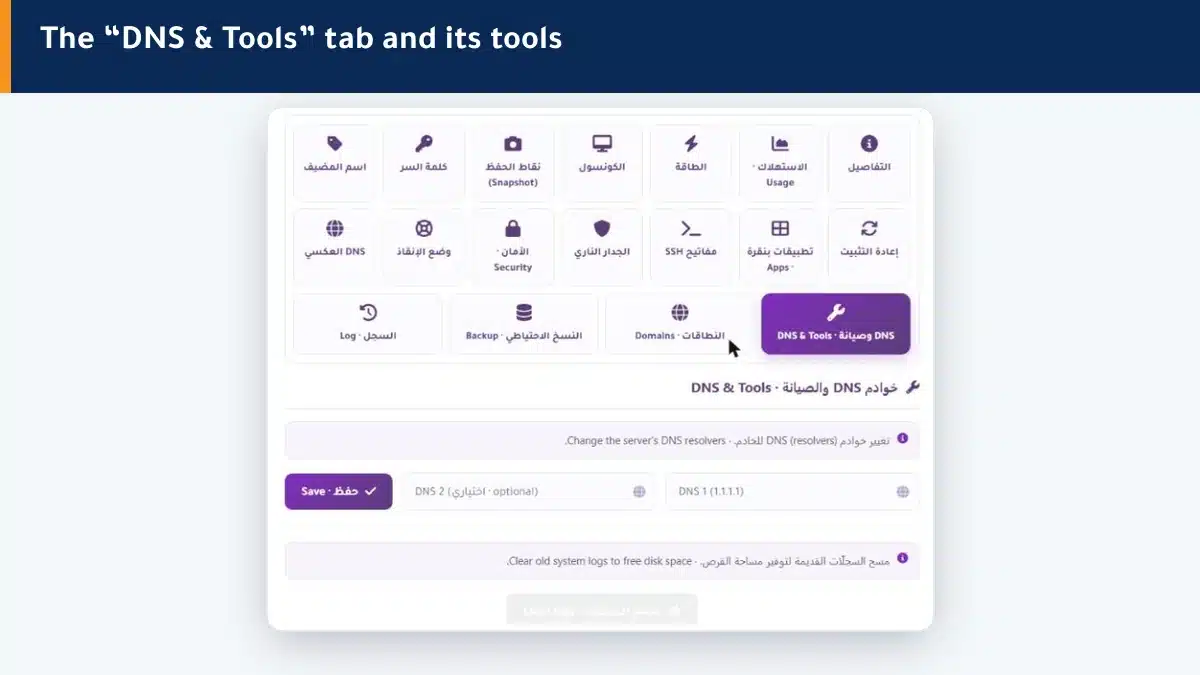
Change DNS resolvers #
DNS resolvers are what turn names (like example.com) into addresses for your machine. You can set two servers:
- Type DNS 1 (primary), such as 1.1.1.1.
- Type DNS 2 (optional) as a backup.
- Click save — your machine starts using them.
Change them if you notice slow name resolution or want a specific server.
Clear old logs #
Over time, system logs pile up and use disk space. The Clear logs button cleans the old ones to free space, without touching your files or sites.
Summary #
- Change DNS resolvers if name resolution is slow.
- Clear old logs to free disk space.
- Both are safe and do not touch your files or sites.
Watch the maintenance effect on disk from the Usage tab.
Frequently asked questions #
What are DNS resolvers?
They are the servers your machine asks to turn domain names into addresses. Changing them may speed up name resolution or let you use a server you prefer.
Does changing DNS resolvers affect my site?
It does not affect how your site works for visitors; it concerns how your machine resolves names when it connects out.
Does clearing logs delete my data?
No. It only clears old system logs to free disk space, and does not touch your files, sites or databases.
When should I clear logs?
When the disk fills up or log space rises. Watch that from the Usage tab.
What is the best DNS server to use?
Reliable public servers like 1.1.1.1 or 8.8.8.8 are a good choice. You can keep the primary and add a second as backup.


