

If your server sends mail, there is a small setting that makes a big difference in whether your mail arrives: Reverse DNS (PTR). It is the reverse of normal DNS: instead of turning a name into an address, it turns your machine address into a name.
Why does reverse DNS matter for mail? #
Receiving mail servers check your sender reverse name. If it is not set, or does not match your machine hostname, your mail may be rejected or go to spam. Setting and matching it raises the servers trust in your mail.
How do I set reverse DNS? #
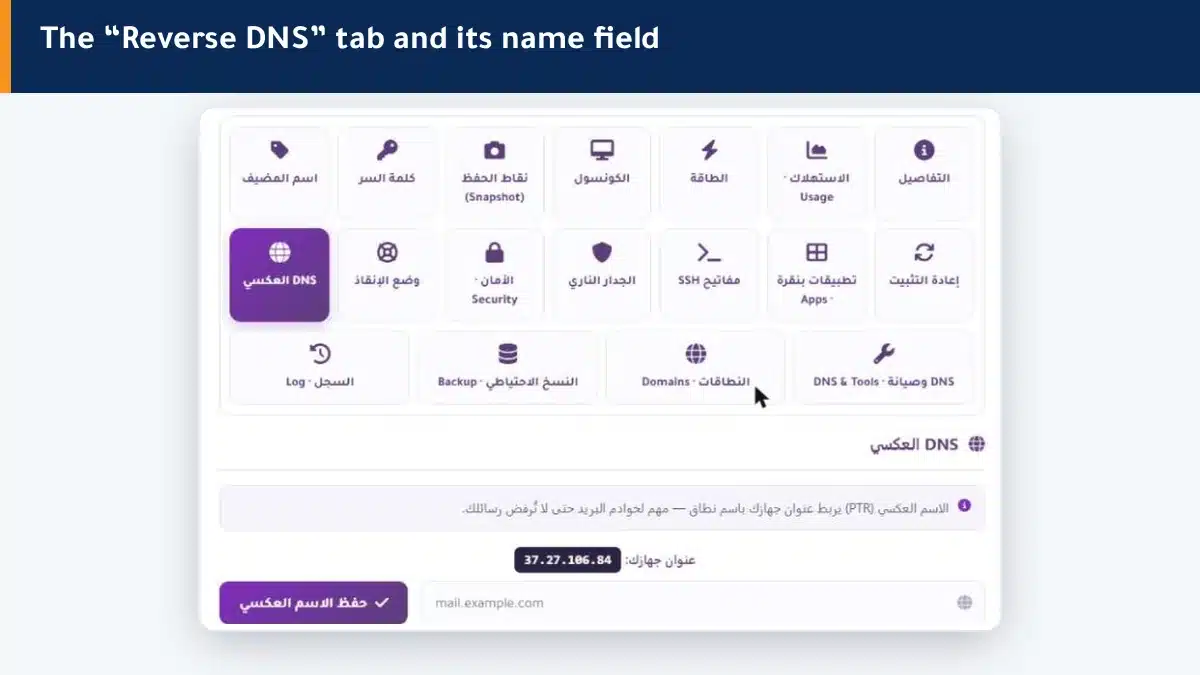
- Open the Reverse DNS tab — your machine address (IP) appears.
- Type the hostname you want to link (such as mail.example.com).
- Click Save reverse name — it applies to your machine address.
Summary #
- Reverse DNS (PTR) links your machine address to a domain name.
- It matters especially for mail servers to reduce rejected mail.
- Make it match your machine hostname.
Also set the hostname to match the reverse name.
Frequently asked questions #
What is reverse DNS (PTR)?
A record that links your machine address (IP) to a domain name, the reverse of normal DNS which links a name to an address. It is used mainly for mail-server checks.
Why do I need to set reverse DNS?
Because receiving mail servers check it. Setting it and matching your hostname reduces the chance of your mail being rejected or marked as spam.
What name do I put in the reverse name?
Your machine hostname, ideally matching the set hostname and its A record, such as mail.example.com.
Is reverse DNS needed if I do not send mail?
Less important if you do not send mail, but setting it does no harm and remains good practice.
I changed the reverse name, when does it take effect?
It applies to your machine address, and may need some time to propagate across internet servers before every party uses it.


