

Before you change an important setting or try something new, you wish you had an “undo” button that puts everything back as it was. That is exactly what Snapshots do: a picture of your machine state you can return to in seconds if things go wrong.
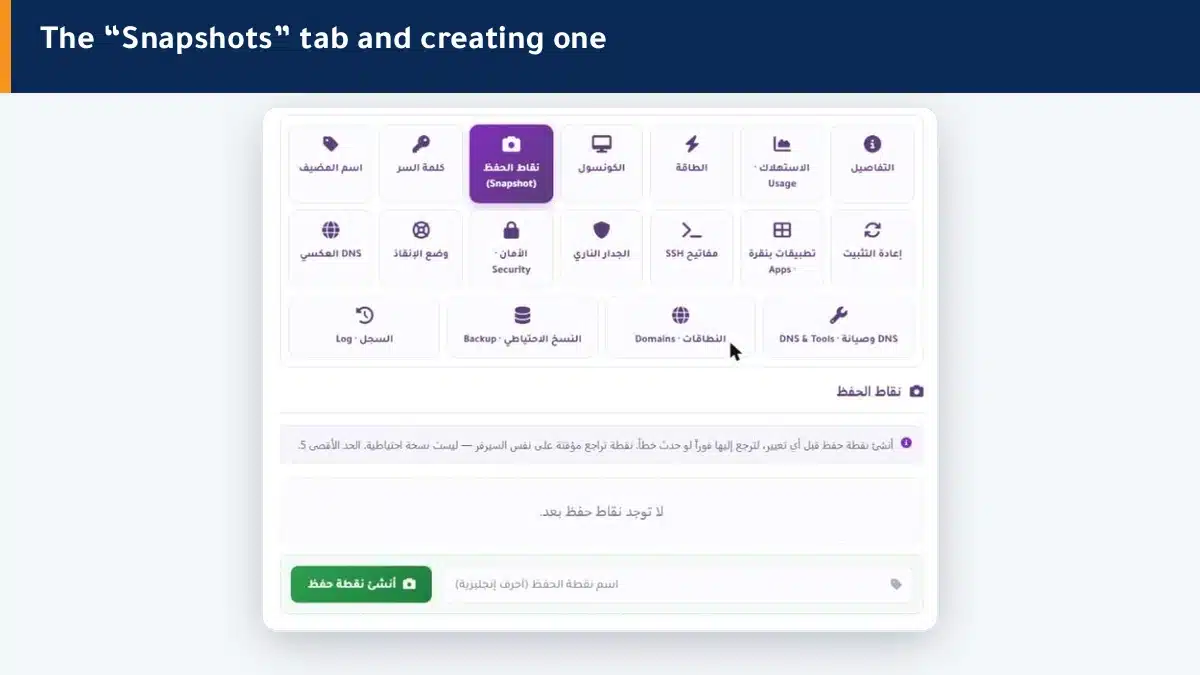
How do I create a snapshot? #
- Open the Snapshots tab in the control panel.
- Type a name for it in English letters (such as before-update).
- Click Create snapshot — it appears in the list within moments.
- To roll back later, click “Restore” next to the snapshot you want.
When should you create a snapshot? #
- Before updating an important system or app.
- Before trying a new setting that could break the site.
- Before a reinstall or any major change.
- Before handing the machine to a developer to work on.
A snapshot is not a backup #
This is the most important thing to understand. A snapshot is temporary and stored on the same server, so if the server itself fails, it is lost with it. It is excellent for a quick rollback of a change, but it does not protect against losing the machine. For real long-term protection, use backups stored off the server.
Summary #
- A snapshot is a picture of your machine state you can return to instantly.
- Create one before any update, experiment or reinstall.
- It is not a backup — for lasting protection, use backups.
For full off-server protection, enable backups.
Frequently asked questions #
What is the difference between a snapshot and a backup?
A snapshot is temporary and on the same server, suited to a quick rollback of a change. A backup is stored off the server and protects you even if the machine itself fails. Use both for different purposes.
How many snapshots can I create?
Up to 5. If you reach the limit, delete an old snapshot you no longer need before creating a new one.
Does rolling back to a snapshot delete what came after it?
Rolling back returns the machine to its state at that snapshot, so changes made after it will not be present. Create a new snapshot before rolling back if you want to keep the current state.
When should I create a snapshot?
Before any step that could break something: an important update, a setting experiment, a reinstall, or handing the machine to a developer. It takes seconds and can save you hours.
Why must the snapshot name be in English?
Because the system stores the name as a technical identifier that does not accept Arabic letters. Use English letters, numbers and hyphens only, such as before-update-2.


