

Sometimes the easiest fix is a fresh start: a different operating system, or a clean machine after an experiment that broke the settings. The Reinstall tab does this in one action, but it is a decisive step you must understand well before running it.
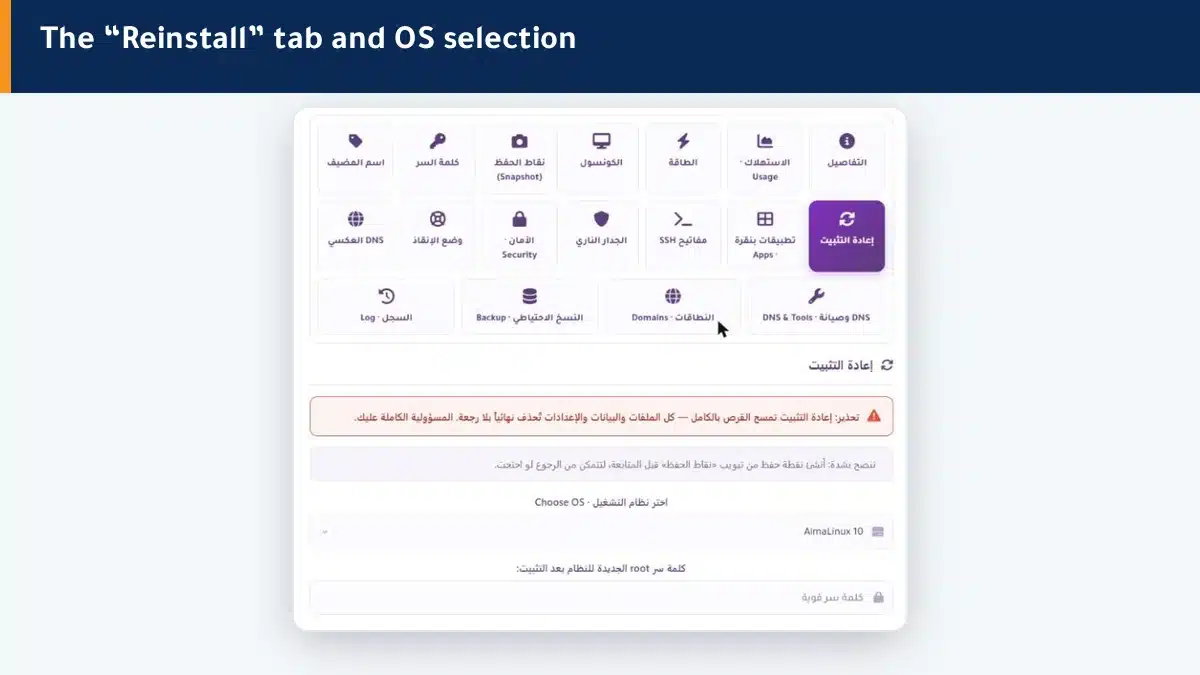
Before you begin: one step that protects you #
- Create a snapshot from the Snapshots tab so you can roll back if needed.
- Move any files or databases you want to keep to a place outside the machine.
- Prepare a strong new password for the root account after install.
Reinstall steps #
- Open the Reinstall tab in the control panel.
- Choose the operating system from the list (such as AlmaLinux or Ubuntu).
- Type the new root password you will use after install.
- Confirm and start, then watch the boot from the Console.
The machine starts with a clean disk and the new system within minutes. Once the boot completes it is ready to receive your setup again.
After reinstall #
- Log in with the new root password you chose.
- The machine may need a moment to respond on the network after the first boot.
- Reinstall what you need, or consider one-click apps to get a ready site quickly.
Summary #
- Reinstall wipes the disk and installs a clean system — no going back once it runs.
- Create a snapshot and save your data before you begin.
- Choose the OS, set the root password, and watch the boot from the console.
If you want a ready site right after install, try one-click apps.
Frequently asked questions #
Does reinstall delete all my data?
Yes, it wipes the whole disk: files, sites, databases and settings are permanently deleted. Save what matters and create a snapshot before you begin.
What is the difference between reinstall and reboot?
Reboot shuts the system down and boots it again with your data intact. Reinstall wipes the disk and starts with a new system from scratch. The names are similar; the difference is fundamental.
How long does a reinstall take?
Usually a few minutes until the new system boots. Watch the progress from the Console (noVNC) in real time.
Can I go back after a reinstall?
The operation itself cannot be undone. But if you created a snapshot beforehand, you can roll back to the machine state at that snapshot.
I forgot the root password after install, what do I do?
Change it right away from the “Password” tab in the panel, then log in with it over SSH or the console.


