

In short: ModSecurity is a web application firewall that works with the web server and protects your site from common attacks such as SQL injection and XSS by inspecting HTTP requests. Control it from cPanel, then Security, then ModSecurity: turn it on or off for all domains, or for each domain separately. Only turn it off temporarily to diagnose a problem, then turn it back on.
ModSecurity is one of the most important security tools for web servers. It inspects HTTP traffic and blocks known attack patterns before they reach your website.
1. Log in to cPanel (see how to log in to cPanel).
2. In the Security section, click ModSecurity.

3. Use the switch at the top to turn ModSecurity on or off for all your domains, or the On/Off switch next to each domain or subdomain.
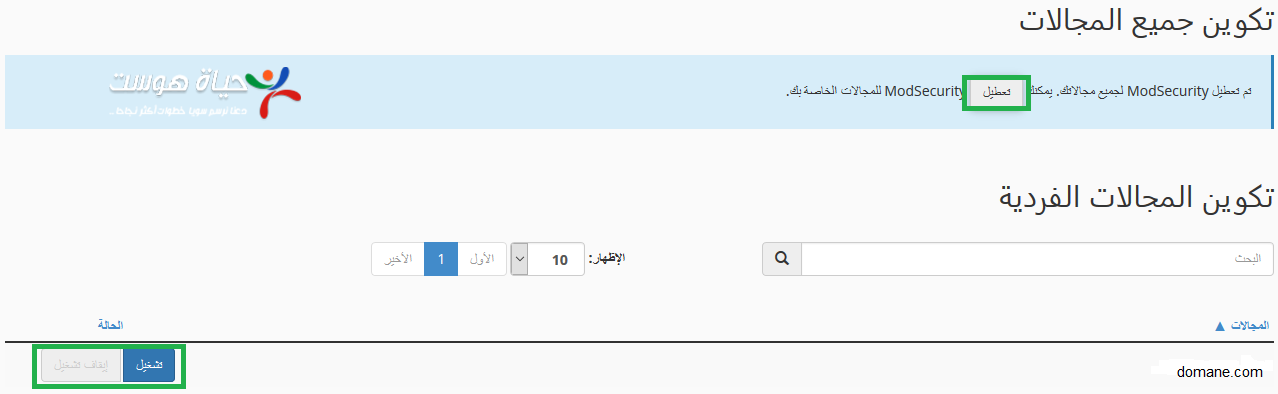
Tip: if a legitimate action on your site is blocked (for example saving a page), contact support with the time and URL so we can adjust the rule, instead of leaving ModSecurity off.
Related service: Hyyat Host shared hosting includes ModSecurity protection and 24/7 support.


